
Bandicam Recast
Bandicam Recast keeps the motion, timing and camera movement of your video and changes the characters, products, outfits or background into the look you want. Open it from Motion Transfer in the left menu.
Change your first video
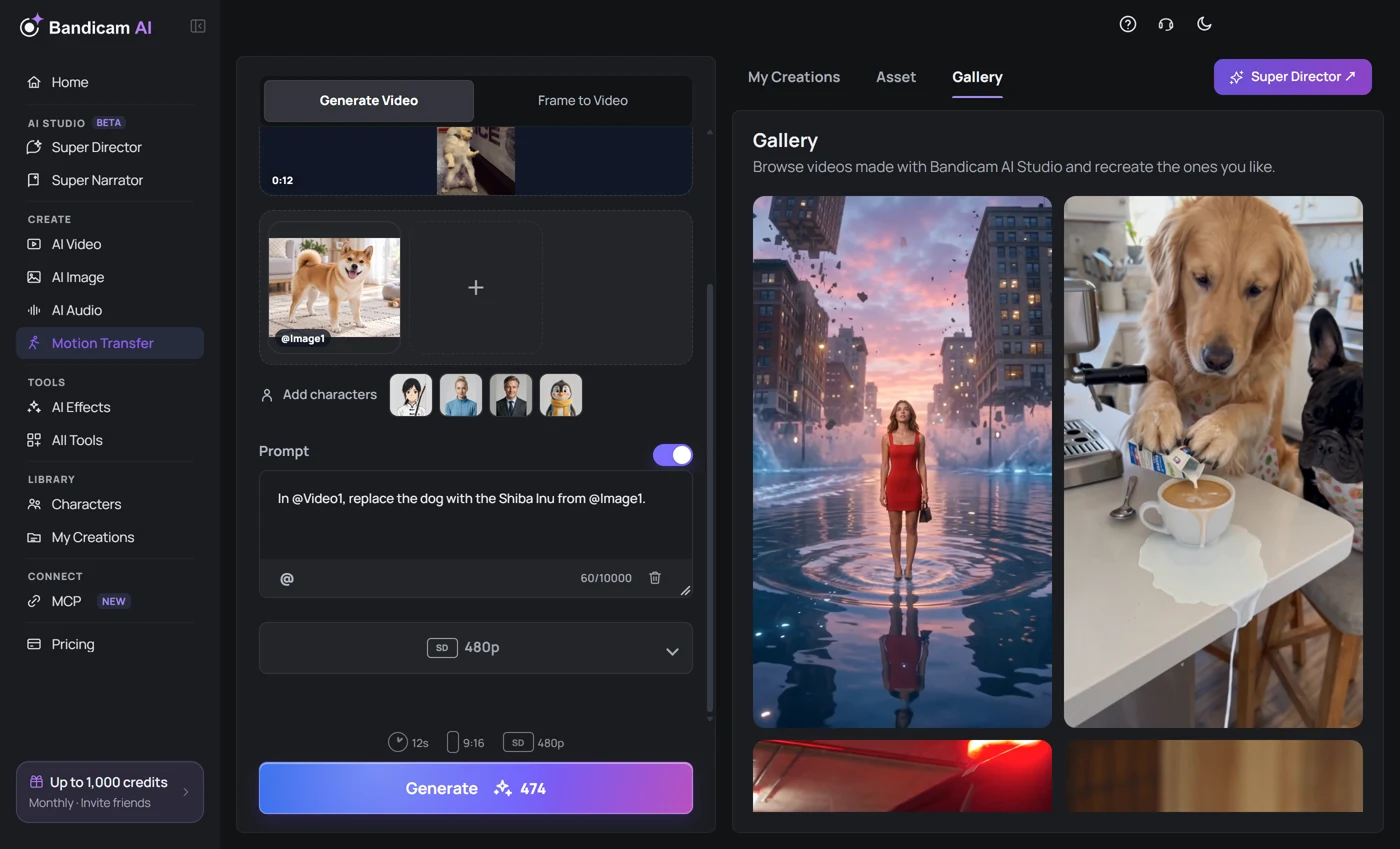
- Add the source video whose motion you want to keep: MP4 or MOV.
- Add photos of the new look: a character, a product or an outfit. You can also pick a saved character from Add characters.
- Optionally turn on Prompt and write what to change. Press @ to point to the video and photos, for example In @Video1, replace the dog with the Shiba Inu from @Image1.
- Choose a resolution and check the credits on the button.
- Press Generate. The result is saved to My Creations.
Recast and Recast Lite
Both models work the same way; only the source videos and photos they accept differ.
| Model | Source video | Photos | Resolution |
|---|---|---|---|
| Recast | 4–30 seconds, up to 200 MB | Up to 30, 30 MB each | 480p, 720p, 1080p |
| Recast Lite | 2–15 seconds, up to 100 MB | Up to 10, 20 MB each | 480p, 720p, 1080p |
What stays and what changes
- The result follows the length and aspect ratio of the source video and keeps its original sound.
- With Prompt off, Recast decides what to replace from your photos. To be exact, for example which of several people becomes which photo, turn Prompt on and say so.
- If you don't mention the background, the original one stays. Name a new place to change it as well.
- People and objects you don't mention stay as they are.
Re-Edit and the Gallery
Open a result in My Creations to see the video, photos and prompt you used. Press Re-Edit to load the same settings and make another version with just a different photo. Not sure what to make? Pick an example in the Gallery tab and press Recreate to start from its settings.
What it costs
The cost depends on the length of the source video and the resolution. Once you add the video, the Generate button shows the exact cost. If a generation fails or is blocked, your credits come back automatically.
It says the video length doesn't fit.
The source video must be 4 to 30 seconds for Recast, or 2 to 15 seconds for Recast Lite. Trim it, or switch to the model that fits its length.
It says the frame rate is too high.
Videos larger than 2560×1440 must be 30 fps or lower. Export at 30 fps, or lower the resolution, and upload again.
How is it different from AI Motion Control?
AI Motion Control makes a single character image move like the reference video. Recast edits the original video itself, keeping its scene and camera and changing only the people or objects in it.