
AI Video
AI Video makes video clips from a text prompt, from images, videos and audio you give it, or from a start frame. You choose from many AI video models, and the price is shown before you generate.
Two ways to create
| Tab | Use it when |
|---|---|
| Generate Video | You describe the scene. Add reference images (characters, products, places), videos (motion or camera work) or audio (voice, music) if you have them. With no references, the video is made from text alone. |
| Frame to Video | You have the exact first picture. The video starts from that image; with Add end frame, it moves from one picture to another. |
Step by step
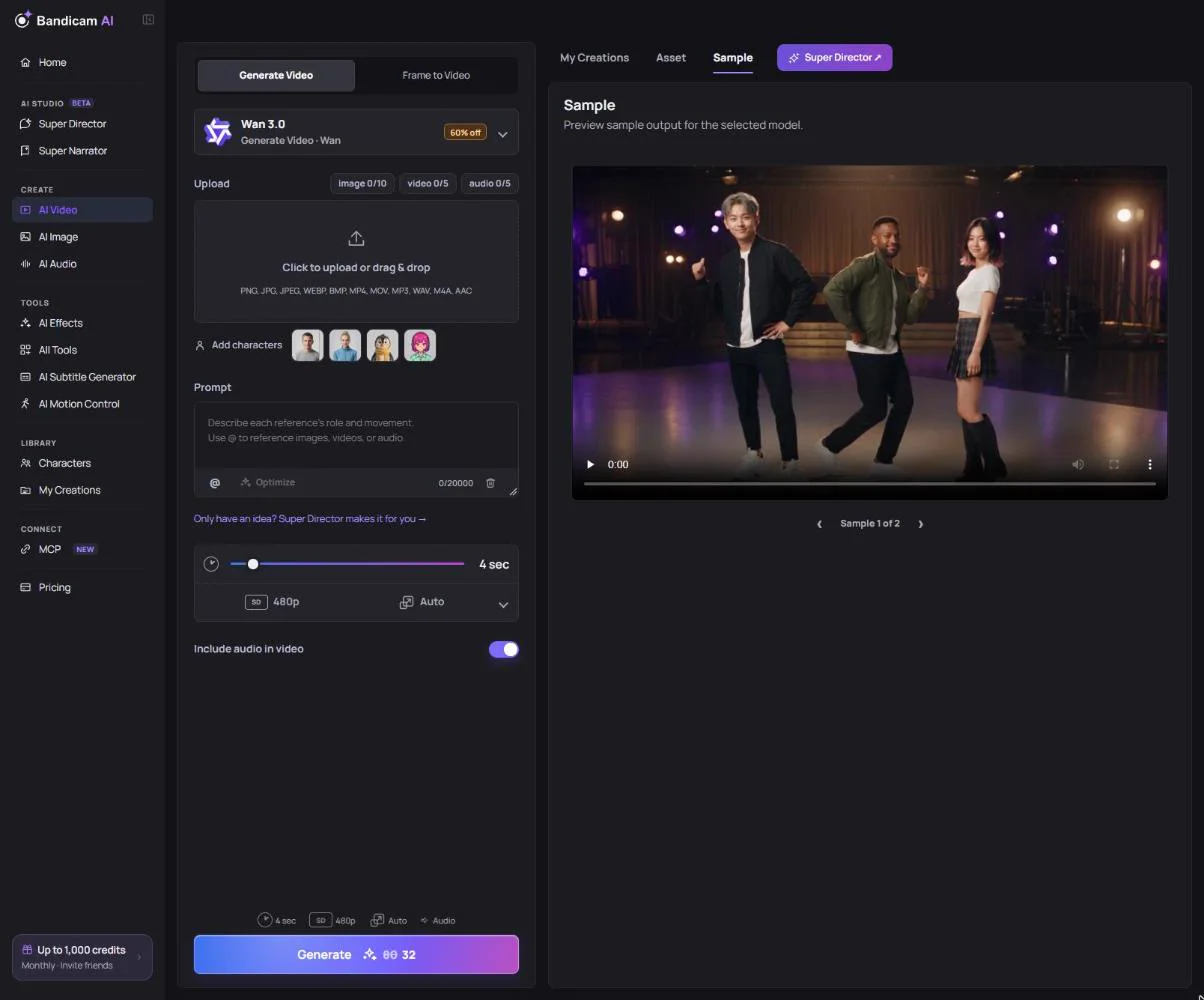
- Choose a tab and a model. Use the Model filter to show low-cost or high-quality models. See Compare video models.
- Add references with the Image, Video and Audio buttons, or Add characters. The counter shows how many more the model accepts.
- Write the prompt. The counter shows how long it can be for the selected model. Type @ to point to a reference, for example “@image1 walks into the cafe and picks up @image2”.
- Set the options (below). The credit cost on the button updates as you change them.
- Press Generate. Most clips take a few minutes. You can leave the page; the result is saved to My Creations.
Options
- Duration — the range depends on the model, from a few seconds up to 30.
- Resolution — from 360p up to 1080p, or 2K and 4K on some models.
- Aspect ratio — 16:9, 9:16, 1:1 and more; some models also offer auto, which follows your references.
- Include audio in video — generate sound and speech with the video, on models that support it.
- Quality — on some models, a faster or a higher-quality version.
- Negative prompt — on supported models, describe what you don’t want to see. The character limit depends on the selected model.
Optimize your prompt
Press Optimize to have the AI rewrite your prompt into a more detailed one that suits the selected model. It also looks at your reference images. Don’t like the result? Undo prompt optimization brings your words back.
Make a video from a storyboard
In Frame to Video, switch the upload to Storyboard image and upload one image with several panels. The model makes one video that follows the panels’ order and composition. This is available on models that support it.
What affects the price
Most models charge per second of video, so longer and higher-resolution clips cost more. On some models, sound or references also change the price. The exact cost is on the Generate button before you start, and models on sale show the discount in the model list.
Super Director and Super Narrator
Would you rather describe an idea than write a prompt? Super Director plans the scenes in a chat and makes the video for you, up to 2 minutes with music and narration. To turn a topic or script into a narrated video with voice, pictures and captions, use Super Narrator.
Photos of real people: Some models don’t accept uploaded photos or videos of real people. Use a Character, an image made with AI Image, or another model. See A generation failed or was blocked.