
Create your first AI image
AI Image creates pictures from a description, or changes and combines pictures you upload.
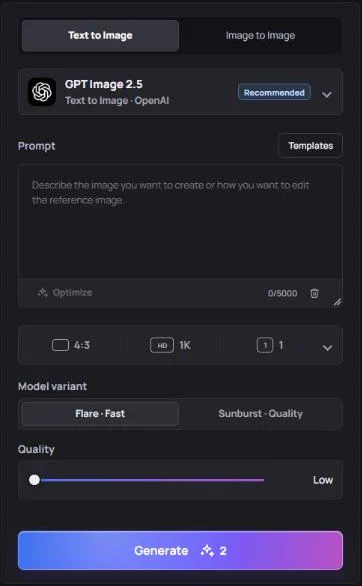
Step by step
- Open AI Image from the menu on the left.
- Choose a tab. Text to Image creates a new picture from your prompt. Image to Image uses one or more uploaded images as a starting point or reference.
- Write your prompt. Describe the subject, setting, style and lighting — for example: “A cozy coffee shop on a rainy evening, warm light, watercolor style.” For Image to Image, say what to change: “Make it a winter scene.”
- Pick a model and options. The selected model is shown at the top of the panel, with options such as aspect ratio, resolution and the number of images (up to 4 per request).
- Press Generate. Images usually appear within a minute and are saved to My Creations.
Tips
- Generate 2–4 images at once to compare variations, then refine the prompt of the one you like.
- Need the same person in many images? Use a ready-made character from Characters — open a character and choose Create a scene.
- You can turn any finished image into a video: use it in AI Video › Frame to Video.
Bandicam AI logo: Images and videos made by accounts that have never bought credits or a plan carry a small Bandicam AI logo. Buying credits or subscribing removes it from new results, and also from earlier images and videos whose original files haven’t been deleted or expired yet.