ZunShot settings - Shortcuts
Hotkeys work whenever ZunShot is running, including in tray mode. The Shortcuts tab lists every command with its key, and each one can be changed or switched off.
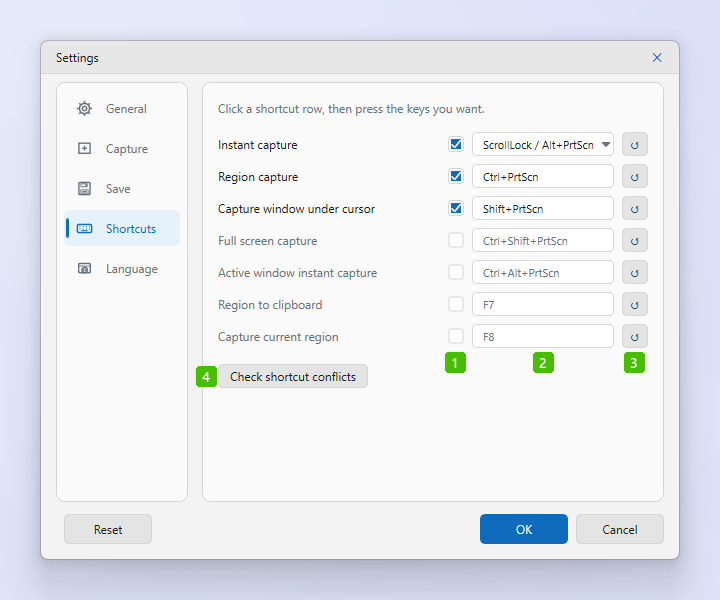
- Enabled: The checkbox in front of a key turns that hotkey on or off. A greyed-out row is not registered, so the key is free for other programs.
- Key: Click the field and press the combination you want. ZunShot shows it immediately and warns if the combination is already taken. The Instant capture row opens a list of ready-made choices and Custom… for your own key.
- Reset: The ↻ button restores the default key for that row only.
- Check shortcut conflicts: Tests every enabled hotkey. If another program holds one of the keys, or a program is known to interfere with capture and clipboard shortcuts, ZunShot names it and offers to close it.
Default hotkeys
| Command | Default key | Enabled |
|---|---|---|
| Instant capture | Scroll Lock / Alt+PrtScn | On |
| Region capture | Ctrl+PrtScn | On |
| Capture window under cursor | Shift+PrtScn | On |
| Full screen capture | Ctrl+Shift+PrtScn | Off |
| Active window instant capture | Ctrl+Alt+PrtScn | Off |
| Region to clipboard | F7 | Off |
| Capture current region | F8 | Off |
Using the PrtScn key on its own
- Assign plain PrtScn to a command. Windows normally reserves that key for its own Snipping Tool, so ZunShot asks whether it may turn the Windows setting off. It turns it back on when you stop using PrtScn.
- Microsoft Store version. ZunShot cannot change that Windows setting itself. It opens Windows Settings for you: turn off Use the Print screen key to open screen capture under Accessibility > Keyboard, then come back.
- Click OK. Hotkeys take effect immediately.
Tips
- Combinations with the Pause key, such as Ctrl+Pause, are shown and registered correctly even though the keyboard sends Break for that key.
- Only one running ZunShot window owns the hotkeys. With Allow multiple instances on, the first window registers them.
Frequently asked questions
A hotkey stopped working.
Another program registered the same key. Click Check shortcut conflicts to find it, then change the key here or close the other program.
Can I use a mouse button?
No. Hotkeys are keyboard combinations.