ZunShot settings - Language
ZunShot ships with 18 interface languages. OCR languages are a Windows feature and are installed separately. If your language is missing, you can add a translation file yourself.
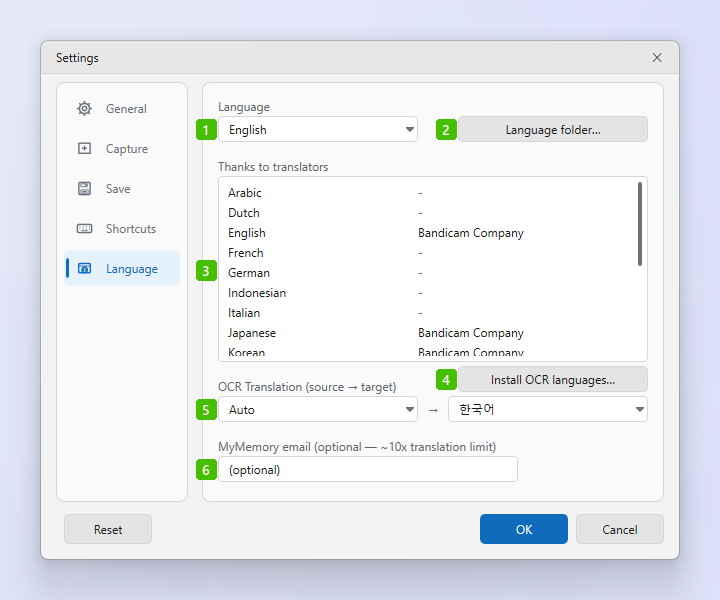
- Language: The interface language. System (auto) follows Windows; otherwise choose English, Korean, Japanese, Simplified or Traditional Chinese, German, French, Dutch, Italian, Spanish, Portuguese (Brazil), Swedish, Turkish, Indonesian, Vietnamese, Russian, Ukrainian or Arabic. The change applies immediately.
- Language folder…: Opens the built-in
langfolder so you can copyEnglish.inias the starting point for your own translation (see below). - Thanks to translators: Who translated each language. A translation you add yourself is listed here as a user file with the name written in the file.
- Install OCR languages…: Installs the Windows language pack that Extract text (OCR) needs for another language, including its typing features, which is what registers the OCR engine. Administrator approval is requested once.
- OCR Translation (source → target): The languages used by image translation. Auto detects the source language; the second list is the language the text is translated into.
- MyMemory email: Optional. Entering an e-mail address raises the free translation limit of the MyMemory service about ten times.
Your own translation
- Copy English.ini. Click Language folder… and copy
English.inifrom the built-in folder. - Create the user language folder. Press Win+R, type
%LOCALAPPDATA%, and createBandicam\ZunShot\langinside it. - Translate and save. Translate the values, keep the keys, and save the file in that folder under the name of the language it replaces. Keys you leave out fall back to English.
- Switch to it. Choose the language in option 1. Files in the user folder reload when you return to the ZunShot window, so you can test edits without restarting.
Frequently asked questions
OCR still fails after installing the language.
Open Windows Settings > Time & language > Language, pick the language, and make sure Basic typing is installed. The language pack alone does not register the OCR engine.