ZunShot settings - Save
The Save tab sets the file format, the folder and the naming rule that every automatic save uses, plus the cloud account for uploads and the watermark. The same folder and format apply to Save, hotkey saves and Burst capture.
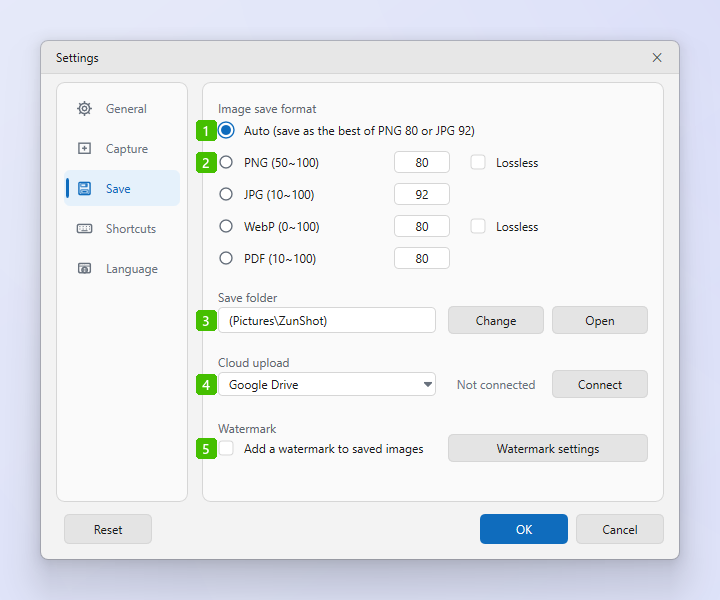
- Auto: ZunShot looks at the image and saves it as PNG or JPG, whichever suits the content, using the quality values set in option 2. Screenshots of text and windows become PNG, photos and video frames become JPG.
- PNG / JPG / WebP / PDF: Pick one format for every save. The number is the quality: for JPG, WebP and PDF it is the compression quality; for PNG a value under 100 reduces the colours to make the file smaller. Tick Lossless for PNG or WebP to keep every pixel unchanged regardless of the number.
- Save folder: Where automatic saves go. The default is
Pictures\ZunShot. Change picks another folder, including a synced folder such as OneDrive; Open shows it in Windows Explorer. - Cloud upload: Choose Google Drive, Dropbox or OneDrive and click Connect to sign in once. The status next to the list shows whether the account is connected. See Upload & Share.
- Add a watermark to saved images: Stamps your logo or text on every saved image. Watermark settings opens the editor where you set the image, text, position and opacity. See Watermark.
File names
Automatic saves are named after the moment of capture, so files never overwrite each other and sort by time:
| Save | File name |
|---|---|
| Capture, hotkey save, Instant Capture save | ZunShot_YYYYMMDD_HHMMSS.png (extension follows the format) |
| Extract text (OCR) result | ZunShot_Text_<width>x<height>_YYYYMMDD_HHMMSS |
| Burst capture | burst_YYYYMMDD_HHMMSS\ZunShot_001.png, ZunShot_002.png … one folder per session |
| Daily auto capture | daily-auto-capture\YYYYMMDD\ZunShot_HHMMSS.png |
To choose a name yourself, use Save As in the editor instead of Save.
Tips
- Open the folder any time with Folder on the Capture or Edit ribbon, or with Open file location in a tab's right-click menu.
- The format list in the bottom bar of the main window changes the same setting as option 1 and 2.
- Burst capture can delete daily folders older than a number of days. That option is in the Burst dialog, not here.
Frequently asked questions
My screenshots are saved as JPG but I want PNG.
Auto chose JPG because the image looked like a photo. Select PNG in option 2 to force it.
Can I ask for a file name every time?
Use Save As instead of Save. Automatic saves always use the time-stamped name above.