How do I uninstall ZunShot?
Both versions uninstall from Windows Settings. Your saved captures are never deleted.
Steps
- Right-click the tray icon and choose Exit.
- Windows Settings > Apps > Installed apps > ZunShot > Uninstall. The setup-file version also appears in Control Panel > Programs.
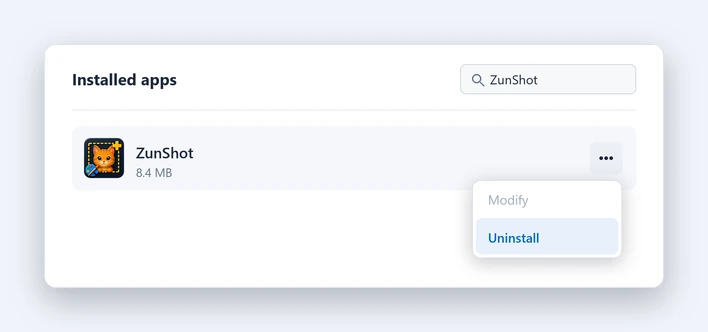
Remove settings and session files
Only if you do not plan to reinstall. Settings are under HKEY_CURRENT_USER\Software\Bandicam Company\ZunShot, session files under %LOCALAPPDATA%\Bandicam\ZunShot.
Good to know
- If you handed the PrtScn key to ZunShot, it is returned to Windows when you exit or uninstall.
- On Windows 10 the desktop shortcut created by the Store version may remain. Delete it by hand.
- Uninstalling does not end a ZunShot Pro subscription. Manage it in your Microsoft account. See Cancel or refund.
Quick answers
- How do I uninstall ZunShot?
- Exit from the tray icon, then Windows Settings > Apps > Installed apps > ZunShot > Uninstall.
- Does uninstalling delete my screenshots?
- No. Files in your save folder are never touched.
Related FAQs
- [Black] My capture is black or empty
- [Hotkey] A hotkey does not work / no Scroll Lock / PrtScn opens Snipping Tool
- [Clipboard] Copy fails or the paste has a white background
- [Scrolling] Scrolling capture stops early or looks misaligned
- [OCR] Extract text returns wrong characters or nothing
- [Window] The ZunShot window disappeared
- [Update] How do I update ZunShot?
- [Support] How do I contact ZunShot support?