The ZunShot window disappeared
Closing the main window sends ZunShot to the notification area so the hotkeys keep working.
Bring it back
- Click the ZunShot icon in the notification area next to the clock. If it is hidden, click the ^ arrow first.
- Or press a capture hotkey. The editor opens with the new capture.
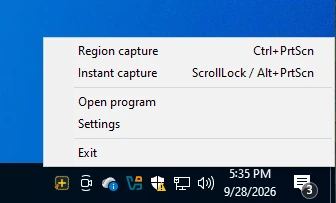
Exit completely
Right-click the tray icon and choose Exit.
Start in a different mode
Settings > General > Mode on startup: Capture mode, Editor mode or Tray mode.
The window opens off-screen
This happens after removing a monitor. Press Win+Shift+Left or Right arrow while ZunShot is active to move it to a connected screen.
Quick answers
- Where did the ZunShot window go?
- It is in the notification area. Click the tray icon or press a capture hotkey.
- How do I quit ZunShot completely?
- Right-click the tray icon and choose Exit.
Related FAQs
- [Black] My capture is black or empty
- [Hotkey] A hotkey does not work / no Scroll Lock / PrtScn opens Snipping Tool
- [Clipboard] Copy fails or the paste has a white background
- [Scrolling] Scrolling capture stops early or looks misaligned
- [OCR] Extract text returns wrong characters or nothing
- [Update] How do I update ZunShot?
- [Uninstall] How do I uninstall ZunShot and remove its data?
- [Support] How do I contact ZunShot support?