Why is there a ZunShot watermark on my image?
Captures never carry a watermark. The mark appears only on images edited with the drawing, blur or crop tools in the free version.
When the watermark appears
- You drew, blurred, cropped or otherwise changed the image in the editor, then saved or copied it, and you do not have ZunShot Pro.
ZunShot tells you before it happens. When you save an edited image in the free version, this window appears:
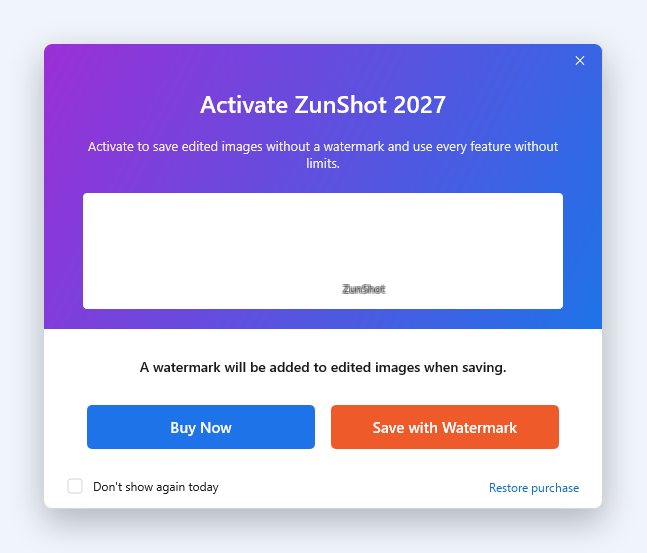
- Buy Now opens the ZunShot Pro plans. After the purchase the image is saved without the watermark.
- Save with Watermark saves the image as shown in the preview, with a small ZunShot mark.
- Don't show again today skips this window for the rest of the day and saves with the watermark straight away.
- Restore purchase is for a subscription you already bought with the same Microsoft account.
When it does not
- Captures that you copy, save, print or upload without editing.
- Text extracted with OCR.
- Any image when ZunShot Pro is active.
How to remove it
- Open ⓘ in the title bar and choose Get ZunShot Pro, then pick monthly or yearly.
- Already subscribed on another PC? Sign in with the same Microsoft account and use Restore purchase. See Restore purchase.
Want your own logo instead? See Add a watermark in the guide.
Quick answers
- Does ZunShot put a watermark on screenshots?
- Not on captures. Only images edited in the free version are saved with a small ZunShot mark.
- How do I remove the ZunShot watermark?
- Subscribe to ZunShot Pro from ⓘ > Get ZunShot Pro, or restore an existing purchase with the same Microsoft account.