YouTube
 Google Drive
 Vimeo
VimeoHow to upload videos to Google Drive
Google Drive is a cloud-based storage and sharing solution developed by Google. It allows users to store files in the cloud, access them across devices, and share files with anyone through a link.
If you are using Bandicam and want to share or store videos on your Google Drive, try Bandicam’s upload feature. Bandicam Screen Recorder supports directly uploading video files from Bandicam to Google Drive.
An Additional Tip!
Check out this article to learn how to upload multiple videos or image/audio files at once. » How to save files to Google Drive
How to upload videos to Google Drive from Bandicam

Step 1. Record your PC screen with the Screen Recording, Device Recording, or Game Recording mode.
Step 2. Go to Home > Videos, select the recorded video, click the Upload icon, and choose Upload to Google Drive.
- Don’t Share: Only your Google account can view the uploaded video.
- Create a share link: Anyone with the link can view the uploaded video.
Choose a sharing option, then click Upload.

Step 3. Enter your Google account email address and password to continue.

Step 4. Click Continue to allow Bandicam to connect to your Google account.

Step 5. Check the access option and click Continue.

Step 6. The selected video will be uploaded from Bandicam to Google Drive.

Step 7. After uploading, click Go to view the uploaded video in Google Drive.

[Error] Request had insufficient authentication scopes
If an error message appears when uploading, check the access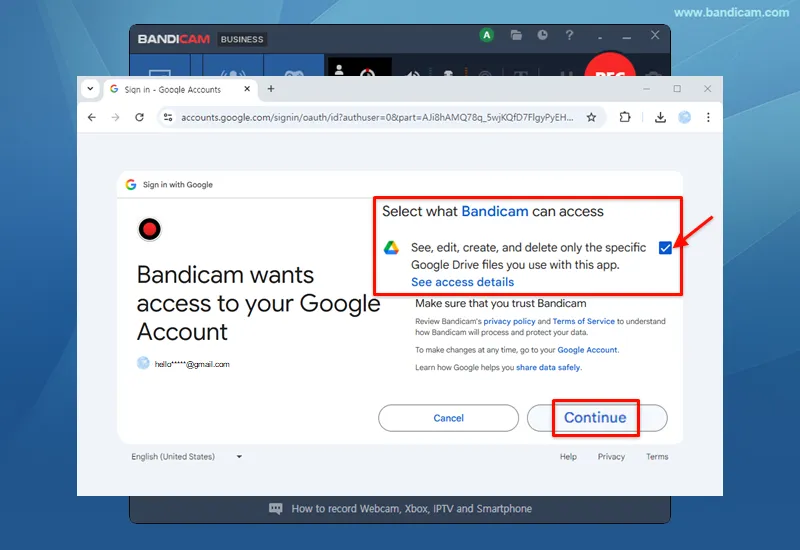 option when signing in to your Google account, and then try to upload again.

Essential Tips and FAQs
![Store recorded videos on a network computer]()
Tip 1) How to safely store recorded videos on a network computer
Security-critical institutions such as banks or insurance companies may want to record and store each employee's computer screen on a central computer over a network.
![How to prevent users from deleting recorded videos]()
Tip 2) How to prevent users from deleting recorded videos
To prevent standard users from deleting videos, such as while recording company computers, you should enable [Recording] and disable [Deleting]. Please visit this page to learn how to enable [Recording] but disable [Deleting] on Windows.
![How to automatically delete old video files]()
Tip 3) How to automatically delete old video files
If you record your computer nonstop for over 24 hours and 365 days, you may want to automatically delete old files to avoid exceeding your hard disk’s capacity. In this case, you can automatically delete old movie files by using the 'Task Scheduler' and 'ForFiles' commands on Windows.
-
![How to automatically back up videos to another HDD or Google Drive]()
Tip 4) How to automatically back up videos to another HDD or Google Drive
You can automatically move recorded files to another HDD or Google Drive using the "Robocopy" command and "Windows Task Scheduler".
![Computer recording 24 hours a day, 365 days a year]()
Tip 5) How to record your PC for 24 hours & 365 days
If you use the "Around mouse" recording mode and Windows Task Scheduler, you can automatically record your computer screen when Windows starts, without the recorder status bar. This function allows you to do PC Monitoring or Surveillance.