How to Install Bandicam
Follow these steps to install Bandicam.
Step 1. Download and run the installer.
First, go to https://www.bandicam.com/downloads/, and download the free version of Bandicam.
After downloading the file, run the "bdcamsetup.exe" file.


If you see "The app you're trying to install isn't a Microsoft-verified app," click Change my app recommendation settings, select Anywhere, and run the installer again.

Step 2. Select the installer language.
Select your preferred language from the list, then click OK.

Step 3. Start the setup.
Click Next to continue.

Step 4. Review the license agreement.
If you accept the terms, click I Agree.

Step 5. Choose the components to install.
Select the components you want, then click Next.

Step 6. Choose the installation folder.
Use the default folder or click Browse to choose another location, then click Install.

If you see Error opening file for writing or Bandicam is in use, end the bdcam.exe process in Task Manager and try again.

Step 7. Complete the installation.
Click Finish to close setup. Leave Run Bandicam checked to open Bandicam immediately.

Step 8. Start Bandicam.
Click the 'Bandicam' icon on your desktop or click the 'bdcam.exe' file in the installation folder.
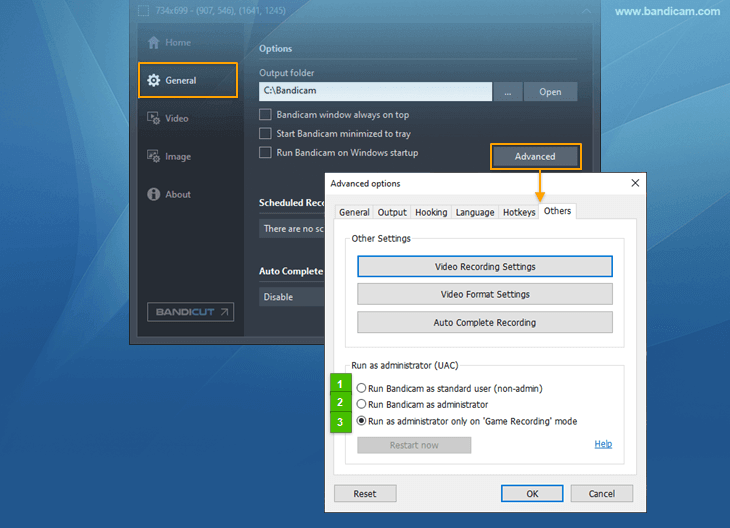
- bdcam.exe (Default): If you click "bdcam.exe" in the Bandicam installation folder (C:\Program Files\Bandicam), Bandicam runs as an administrator or standard user, depending on the Bandicam UAC setting
 .
. - bdcam_admin: Click "bdcam_admin" to run Bandicam as an administrator » "Game Recording" mode and UAC
- bdcam_nonadmin: Click "bdcam_nonadmin" to run Bandicam with a standard user account or guest account.
- bdcam_safemode: Click "bdcam_safemode" if Bandicam doesn't start. It will disable some features of Bandicam, such as a hardware-accelerated H.264 (NVIDIA, Intel, AMD) encoder.
Tip 1) Failed to download and install
If you can't download Bandicam,
- Try another browser, such as Chrome, Edge, or Firefox.
- Check whether your security software or browser extensions are blocking the download.
If Bandicam freezes while installing, uncheck the "Debug" option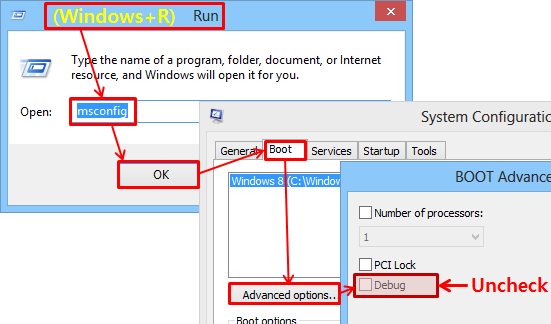 and try again.
» See more
and try again.
» See more
Tip 2) How to activate your license
If you have a license, click the lock icon at the top, then click Activate License. » How to activate your license
