What is the difference between the free and full version?
Compare the Bandicam free trial and full version, including watermark, recording time limits, commercial use, and how to unlock all features.
1. What are the limitations of the Bandicam free trial?
- The free version is limited to 10 minutes per recording, while the full (registered) version has no time limit and can record for more than 24 hours.

- If you use the free version, the watermark (www.BANDICAM.com) will be added to the recorded videos.

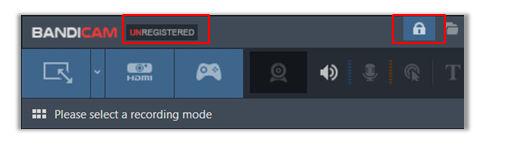
- In the Bandicam trial version, "UNREGISTERED" and the Lock image are displayed at the top of the window.
- You cannot use scheduled recording and continuous recording for 24 hours/365 days with the Bandicam free version.
| Free version | Full version | |
|---|---|---|
| Recording Time Limit | 10 minutes per recording | Unlimited (Over 24 hours recording) |
| No Watermark | X | O |
| Scheduled Recording | X | O |
| Game Recording (avi, mp4) | O | O |
| Screen Recording (avi, mp4) | O | O |
| Webcam/HDMI Recording (avi, mp4) | O | O |
| Image Capture (bmp, png, jpg) | O | O |
| Game FPS overlay and control | O | O |
2. How can I use Bandicam for free?
Despite some of the limited functions in the free version, all other features remain the same as those seen in the full version of Bandicam.
- Download Bandicam from the official website.
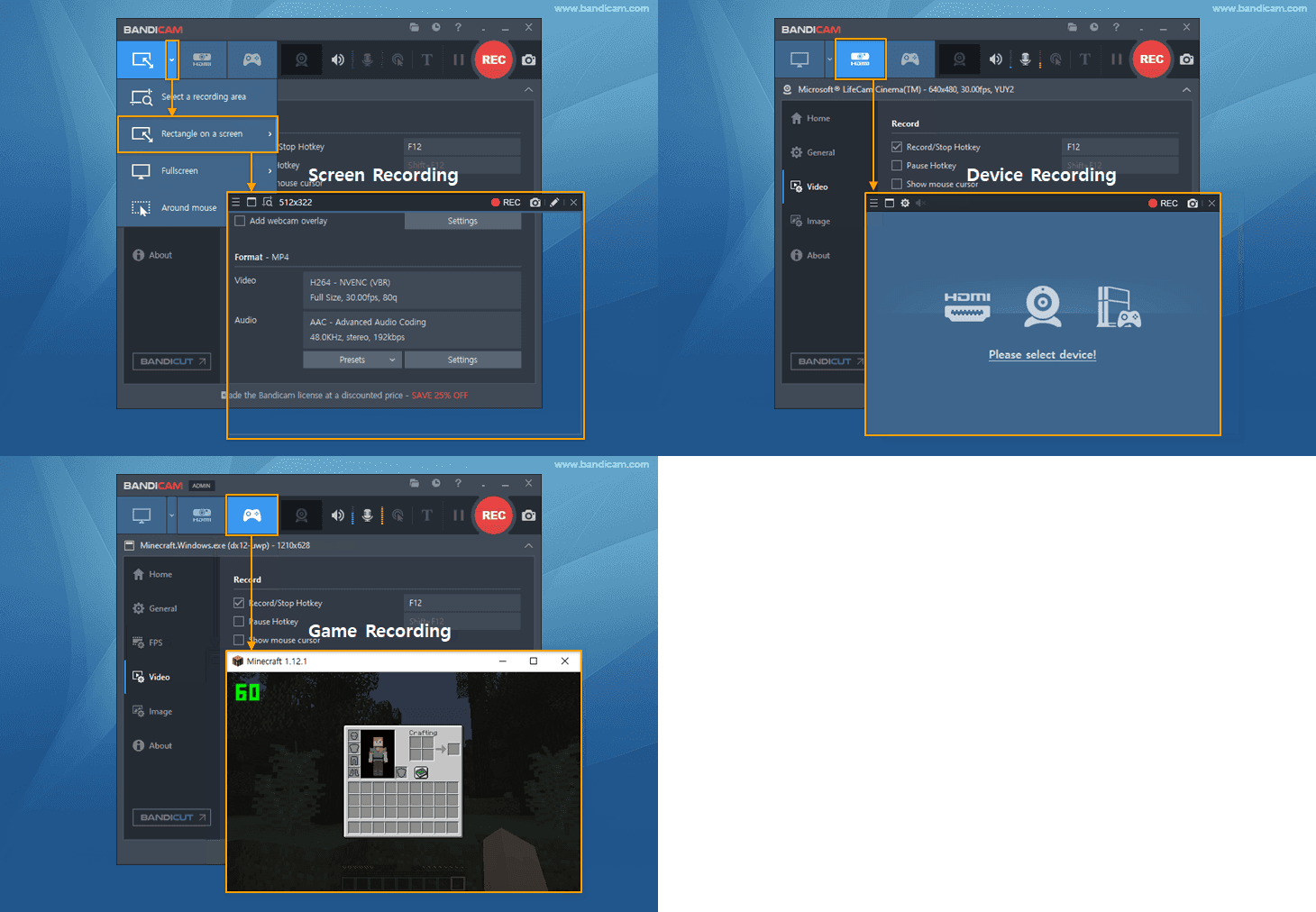
- Start Bandicam, and select the recording function (Screen Recording, Device Recording, Game Recording) of your choice.
- You can use Bandicam for various purposes such as Zoom Meeting recording, Discord recording, making tutorial videos, and video resumes. Check out more ways to use Bandicam. » Tips for using Bandicam
3. Is Bandicam free for commercial use?
Although you can install Bandicam at no cost to test its functions at home, office, school, etc., you must buy the ‘Business License’ to use it for work or commercial use.
4. How can I use Bandicam without a watermark and time limit?
If the Bandicam product is registered, the watermark (www.BANDICAM.com) will not be added to the recorded videos, and the recording time will be unlimited.
- If you purchase Bandicam, you will receive a serial key via email.
- Download the free version of Bandicam, and Start.
- Click on the 'Lock' image in Bandicam, and enter the email address and serial number. When the product registration is complete, the lock image at the top will disappear.
![Register Bandicam]()

FAQs
- What is the difference between the free and full version?
- If the product is registered, the watermark (www.BANDICAM.com) will not be added to the video and the recording time will be unlimited.
- What are the limitations of the Bandicam free trial?
- The free version is limited to 10 minutes per recording and adds the www.BANDICAM.com watermark to recorded videos. The registered full version removes the watermark and recording time limit.
- How can I use Bandicam for free?
- Download Bandicam from the official website and use the recording modes such as Screen Recording, Device Recording, or Game Recording. The free version includes the same main recording features, but it keeps the trial limitations such as the watermark and recording time limit.
- Is Bandicam free for commercial use?
- Although you can install Bandicam at no cost to test its functions at home, office, school, etc., you must buy the ‘ Business License ’ to use it for work or commercial use.
- How can I use Bandicam without a watermark and time limit?
- Purchase a Bandicam license, install the free version, click the Lock icon, and enter the email address and serial number from your license email. After registration, the watermark and recording time limit are removed.
Related FAQs
- Types of Bandicam Licenses | License Policy (Registration/Transfer)
- Lost Serial Number, Resend license
- How to purchase/register Bandicam
- Reseller FAQ and quotation
- Can I get a refund after registering the serial number?
- What is the difference between the free and full version?
- Error messagfe: License exceeded | Registration failed | Cannot connect to the registration server