- Upload videos to YouTube
- Bandicut project file (*.bcpf)
- Capture image from video
- DVD to MP4
- Edit Bandicam videos

Hardware Acceleration in Bandicut

Bandicut supports Hardware Acceleration utilizing the GPU. In addition to the traditional Video Conversion (Encoding) support, Bandicut 4.2.0 now introduces GPU acceleration for Video Playback (Decoding). This guide explains the differences between the encoder and decoder, as well as the support status for different GPUs.
1. What is Hardware Acceleration?
Hardware acceleration is a technology that offloads video processing tasks from the CPU to the GPU, resulting in faster speeds and reduced system load.
Bandicut allows you to use the following two types of hardware acceleration:
- Hardware Encoder (during video conversion)
- Hardware Decoder (during video playback)
2. Differences between Hardware Encoder and Hardware Decoder
| Hardware Encoder (HW Encoder) |
Hardware Decoder (HW Decoder) |
|
|---|---|---|
| Function | Uses the GPU to accelerate video conversion (encoding) | Uses the GPU to enable smooth preview playback in Bandicut |
| Advantages |
|
|
| Example Usage | Effective when exporting videos in H.264 or HEVC formats rapidly | Comfortable preview playback of 4K HEVC videos while editing |
3. How to Set Up Hardware Acceleration
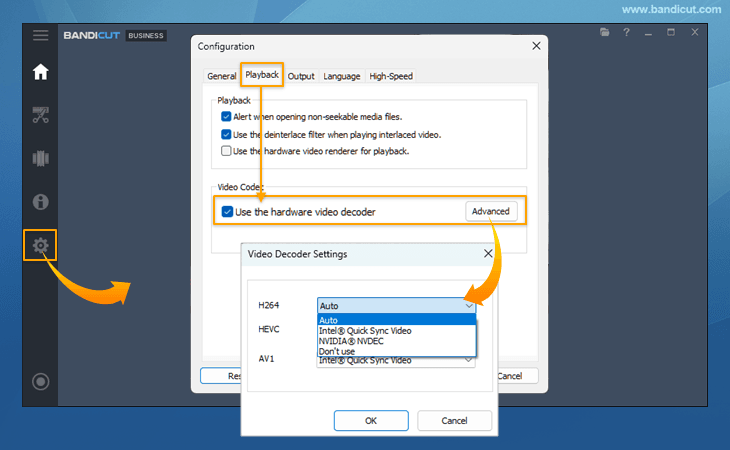
To enable GPU hardware acceleration in Bandicut, you need to set up the Hardware Decoder in the [Configuration] menu and the Hardware Encoder in the [Encoding Settings] within Encoding mode.
Note: If your graphics driver is outdated, these features may not work correctly. We recommend updating your driver to the latest version before use.
- How to use the Hardware Decoder
Bandicut supports hardware decoders for NVIDIA and Intel graphics cards. Using the GPU reduces system load and ensures smoother preview playback.
- How to use the Hardware Encoder
In Bandicut's Encoding mode, hardware encoders are supported for NVIDIA, Intel, and AMD graphics cards. Using the GPU allows you to edit and save videos efficiently with high compression and minimal quality loss, while reducing system load.

4. Hardware Acceleration Support List
| Graphics Card | Hardware Decoder Support | Hardware Encoder Support |
|---|---|---|
 NVIDIA NVENC »
|
H.264 HEVC (H.265) * AV1 decoder is currently not supported |
H.264 HEVC (H.265) * AV1 encoder is currently not supported |
 Intel Quick Sync »
|
H.264 HEVC (H.265) AV1 |
H.264 HEVC (H.265) AV1 |
 AMD VCE/VCN »
|
* Hardware decoder is currently not supported |
H.264 HEVC (H.265) AV1 |
- If the preview (playback) is choppy, try changing the Hardware Decoder to a different decoder.
- If the conversion speed is slow, try changing the Hardware Encoder to a different encoder.
- Processing speed may be slower on CPU-integrated GPUs (such as Intel CPUs) compared to NVIDIA or AMD dedicated graphics cards.
Depending on your PC's graphics card, graphics driver, or Windows environment, specific hardware acceleration codecs may not function properly. In such cases, the CPU will be used for video playback (decoding) or conversion (encoding).
Hardware Acceleration FAQs
Which is faster: High-Speed mode or the Hardware Accelerated Encoder?
[High-Speed mode] is significantly faster than the hardware-accelerated encoder because it does not perform any video re-encoding processes.
Which has better quality: High-Speed mode or the Hardware Encoder?
[High-Speed mode] offers superior quality because it retains the original video data exactly as is without re-converting it, unlike the hardware-accelerated encoder.
Which is recommended: NVIDIA, Intel, or AMD?
- For Output Speed:
High-Speed mode > NVIDIA > AMD > Intel > H.264 (CPU)
- For Quality and Stability:
High-Speed mode > NVIDIA > Intel > AMD > H.264 (CPU)
Which codec is better: AV1, HEVC (H.265), or H.264?
The highest compression efficiency is offered by AV1, followed by HEVC (H.265), and then H.264. However, while AV1 can significantly reduce file size while maintaining the same quality, H.264 is superior in terms of playback compatibility.
Which provides better quality: Hardware Encoder or H.264 (CPU)?
Hardware encoders (using the GPU) are significantly faster than CPU encoding, but there is no noticeable difference in the visual quality of the final output video.
H.264, HEVC, or AV1 Decoders/Encoders are not showing up.
Please install the latest version of Bandicut 2024 or 2025.
If the option still does not appear, please install the latest graphics driver from the manufacturer's website (NVIDIA, Intel, AMD) and restart your computer.
- Bandicut 2025 Latest Version: https://www.bandicam.com/bandicut-video-cutter/download/
- Bandicut 2024 Latest Version: https://www.bandicam.com/bandicut-video-cutter/old-versions/