- Upload videos to YouTube
- Bandicut project file (*.bcpf)
- Capture image from video
- DVD to MP4
- Edit Bandicam videos

How to Install Bandicut
Please follow the steps below to install Bandicut.
1. Download and run
First, go to https://www.bandicam.com/bandicut-video-cutter/download/, and download the free version of Bandicut.
After downloading the file, run the "bandicut-setup.exe" file.


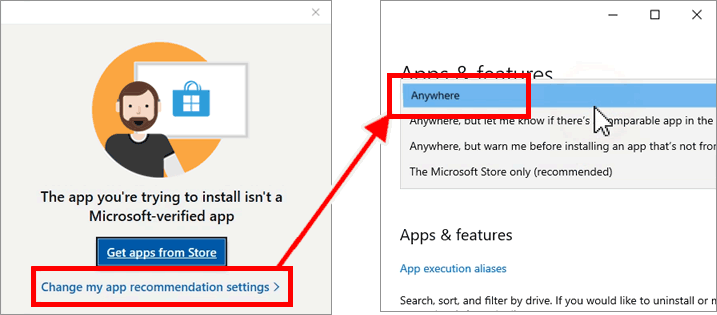
If the installation fails and you see the message "The app you're trying to install isn't a Microsoft-verified app," then click on "Change my app recommendation settings,” select "Anywhere,” and reinstall.
2. Setup window
The 'Bandicut Setup' window will appear. Click 'Next' to continue.

3. License agreement
If you accept the terms, click 'I Agree' to continue.

4. Choose components
Choose the components you want to install. Click 'Next' to continue.

5. Choose installation location
Enter the location where you want to install Bandicut, and click 'Install' to continue.

If you see the "Error opening file for writing" or "Bandicut is in use" error message, end the "bdcut.exe" process from Task Manager and try again.

6. Complete installation
Once you see the 'Completing the Bandicut Setup' window, click 'Finish' to complete your installation.

7. Start Bandicut
Click the 'Bandicut' icon on your desktop or click the 'bdcut.exe' file in the installation folder.

- bdcut.exe (Default): Go to the installation folder (C:\Program Files\Bandicut), click "bdcut.exe" to start Bandicut.
- bdcut_admin: Click "bdcut_admin" to run Bandicut as an administrator.
- bdcut_safemode: Click "bdcut_safemode" if Bandicut doesn't start. It will disable some features of Bandicut, such as a hardware-accelerated H.264 (NVIDIA, Intel, AMD) encoder.