Bandicam License Policy
Learn Bandicam license rules for registration, PC limits, license transfer, annual renewal, email changes, and lost serial key recovery.
[ Personal License and Business License ]
The Bandicam software provides "Personal" and "Business" licenses according to the subject and purpose of use. The Personal License is for individuals who want to use Bandicam for non-commercial purposes. You must purchase a Business License to use the software for commercial purposes.
1. License Registration
- Click the 'Lock
 ' image and enter your email address and serial number to register. Once the license is registered, you cannot get a refund or resell the license.
 - With a 1-PC license, you can register up to 1 computer. If the maximum license count has been exceeded, the user's license may be revoked without a refund. If you want to use Bandicam on 2 computers, please purchase a 2-PC license.

2. License Management
1) How to use Bandicam on 2 computers
Even if you do not use Bandicam at the same time on 2 different computers, you must purchase a 2-PC license to use it on two devices. If you want to use your license on another computer, you must either uninstall the existing registered Bandicam or purchase another license.
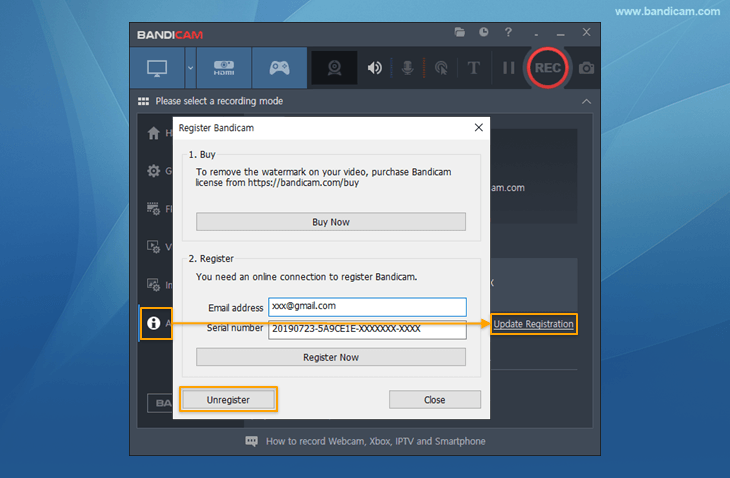
2) How to transfer your license to another computer
You can re-use your license if you unregister Bandicam or your computer is broken.
3) How to renew your Annual License
If you didn't check the "Renew my license automatically" option when purchasing, go to the Bandicam renewal or Bandicut renewal page to renew your license manually. If you checked the option when purchasing, you can simply manage your subscription.
4) How to change the email address or serial number
If you have already registered your license, you cannot change the email address associated with it. You will not have any problems as long as you keep your license information and follow the license policy. If you really need to change your license information, go to https://www.bandicam.com/buy/upgrade-to-new/, upgrade your Perpetual License, and immediately send an email to bandicam@bandicam.com so that we can change your license information.
3. Retrieve License
- Go to https://www.bandicam.com/buy/#retrieve and enter the email address used for purchasing the license in the "Resend Purchased License" section. The license will then be sent to your email again.
- If you no longer have access to that email address, please send your payment receipt to bandicam@bandicam.com for further assistance. Please note that if you do not have the receipt and cannot access the original email, you will need to repurchase the license.
4. Annual License Management
You can renew your Annual License on the [Bandicam Annual License renewal] or [Bandicut Annual License renewal] page.
Related FAQs
- Types of Bandicam Licenses | License Policy (Registration/Transfer)
- Lost Serial Number, Resend license
- How to purchase/register Bandicam
- Reseller FAQ and quotation
- Can I get a refund after registering the serial number?
- What is the difference between the free and full version?
- Error messagfe: License exceeded | Registration failed | Cannot connect to the registration server