I can't run Bandicam; it crashes/freezes/stops
Fix Bandicam startup, install, crash, freeze, and recording stop problems with troubleshooting steps for drivers, codecs, and conflicts.
Problems and solutions according to recording flow:
Case 1: Failed to download and install
If you can't download Bandicam,
- Try other web browsers such as Firefox, Chrome, Safari, Edge, etc.
- Disable antivirus or toolbar programs.
If Bandicam freezes while installing, uncheck the "Debug" option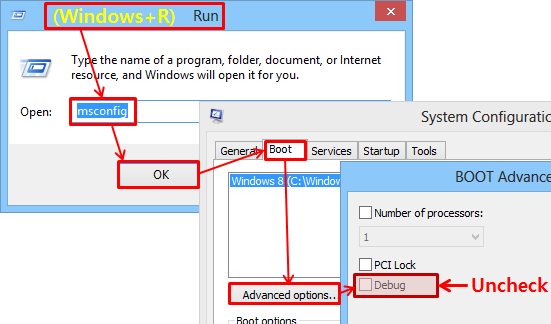 and try again.
Case 2: Failed to start Bandicam, it won't open
If Bandicam doesn't start, please try the solutions below:
1. Download the latest version of Bandicam and try "bdcam_safemode"
- Uninstall Bandicam -> Download the latest version of Bandicam -> Go to the installation folder (C:\Program Files\Bandicam), and click "bdcam_admin, bdcam_safemode or bdcam_nonadmin"
 .
. - Right-click on the Bandicam icon -> Properties -> Uncheck "Run this program in compatibility mode for:"


If you can start Bandicam with "bdcam_safemode", uninstall your graphics card drivers , reinstall the latest graphics card driver, restart your computer, and try again (Very important).
- Nvidia: https://www.geforce.com/drivers
- Intel: https://downloadcenter.intel.com/
- AMD: https://www.amd.com/en/support
2. Check the Bandicam icon on the system tray
If you checked the "Start Bandicam minimized to tray" option, please click the Bandicam icon on the system tray.

3. Disable suspicious programs or copy-protection programs
If Bandicam started and then disappeared, there might be a compatibility issue with other programs such as antivirus (e.g., VMware Carbon Black, Intego antivirus, Kaspersky) or copy-protection programs.
Please add Bandicam to the exclusions list of your antivirus program, uninstall copy-protection programs, or end suspicious programs from Task Manager of Windows .
.
If you still have problems, download https://dl.bandicam.com/tools/bsa.exe and send your installed program list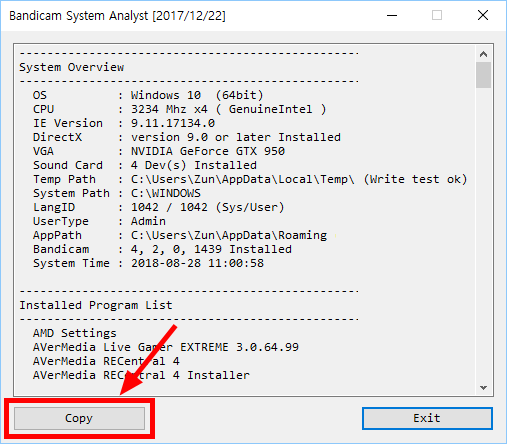 to bandicam@bandicam.com
Case 3: Bandicam crashes/freezes when I start recording
If Bandicam crashes/freezes when you start recording, please try the solutions below:
1. Reset Bandicam settings, choose the "H264 (CPU)" video codec, and try again.


2. Uncheck the 'Record sound' option, or disable your microphone and try again.

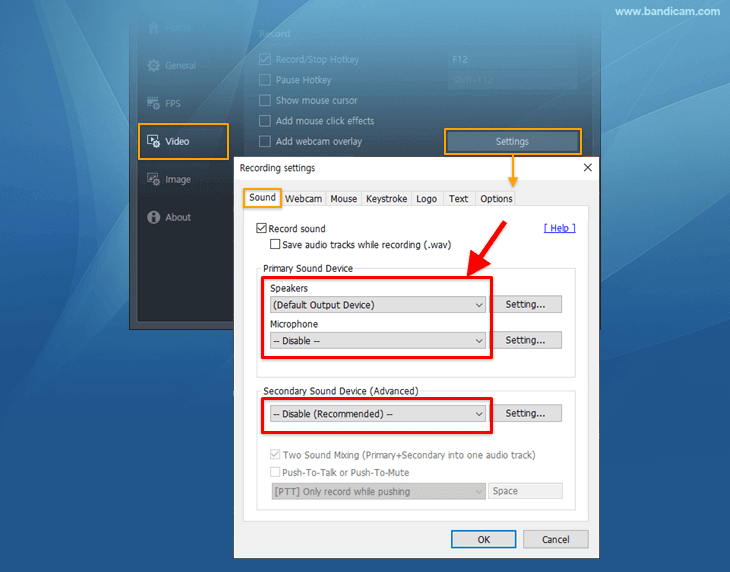
3. Uninstall the graphics card driver and reinstall the latest graphics card driver.
4. Please check if you can take a screenshot (.JPG) through Bandicam.
If you can't take a screenshot, there must be a compatibility issue with other programs such as antivirus or copy-protection programs.
Please add Bandicam to the exclusions list of your antivirus program, uninstall copy-protection programs, or end suspicious programs from Task Manager of Windows .
.
5. Other solutions
- Set the output folder as another folder such as "C:\Bandicam."
- If you have a problem with the 'Game Recording Mode,' try Bandicam 5.0.1 (old version).

Case 4: Bandicam freezes while recording or when I stop recording
1. There might be a problem with the video codec
- Please choose the XVID or H264 (CPU) video codec.
2. There might be a problem with your graphics card driver
If Bandicam crashes/freezes/stops while recording, completely uninstall Bandicam and graphics card driver. Then, reinstall the latest version of Bandicam and the latest graphics card driver.
FAQs
- What should I do if Bandicam fails to download or install?
- If you can't download Bandicam, Try other web browsers such as Firefox, Chrome, Safari, Edge, etc. Disable antivirus or toolbar programs. If Bandicam freezes while installing, uncheck the "Debug" option and try again.
- What should I do if Bandicam will not open?
- Install the latest Bandicam version, try running bdcam_safemode from the installation folder, and reset Bandicam settings. If it still will not open, check security software, Windows permissions, and related system updates.
- Why does Bandicam crash or freeze when I start recording?
- Reset Bandicam settings, try the H264 (CPU) or Xvid codec, and test with the Record sound option disabled. If the issue continues, reinstall Bandicam and update your graphics and sound drivers.
- Why does Bandicam freeze while recording or when I stop recording?
- Change the video codec to Xvid or H264 (CPU), update or reinstall the graphics driver, and reduce recording settings such as resolution, FPS, and quality. Testing without sound recording can also help isolate audio-driver problems.