How to record Skype calls - Audio / Video
Bandicam usually uses 'Screen Recording' mode to record Skype video calls.
To record the Skype calls, please visit https://www.bandicam.com/how-to/screen-recorder/
How to record Skype calls + Computer sounds + My voice?
With Bandicam, you can record Skype calls, your voice, your friend's voice, game/computer sounds at the same time.
If you can't record the Skype calls (Your voice and Your friend's voice), please check the settings below:
1. Bandicam settings for Skype
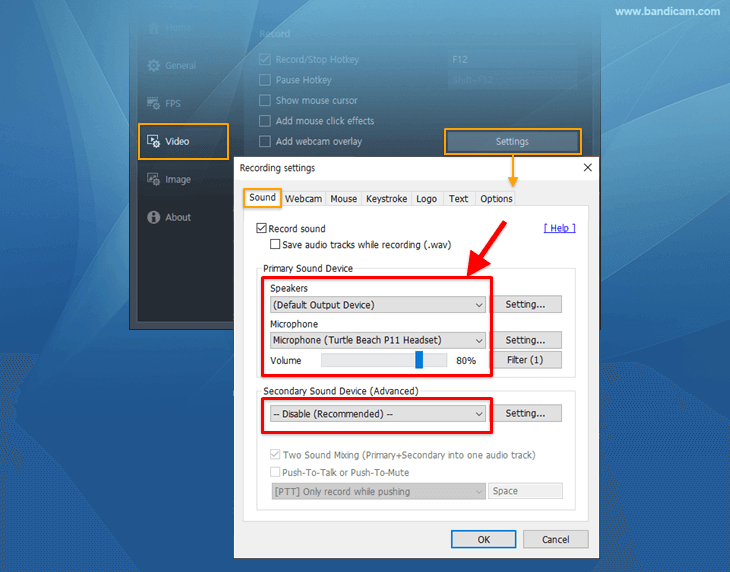
- 1 Select "(Default Sound Device)". It will allow you to record computer sounds and your friend's voice.
- 2 Select "Your Microphone". It will allow you to record your voice/microphone.
- 3 Check "Two Sound Mixing". It will allow you to merge the Primary+Secondary sound into one audio track.
2. Windows settings for Skype
When you start Skype, Skype/Windows will change your computer volume automatically.
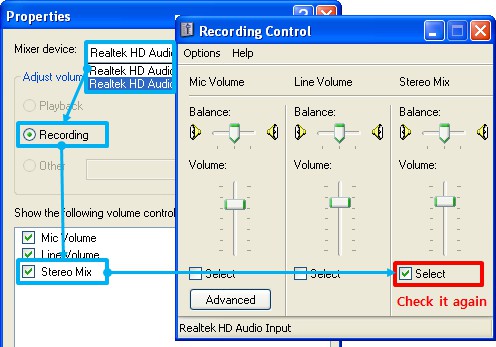
* Windows XP users
When you are talking with your friends in Skype, "Stereo Mix" may be unchecked by Windows.
To record game/program/video/audio sounds with Skype, you should re-check "Stereo Mix" while you are talking and increase the "Stereo Mix" volume.
* Windows Vista/7/8/10 users
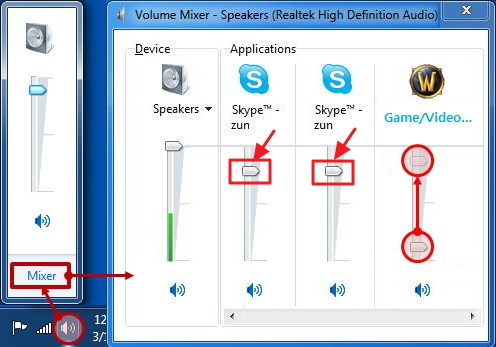
When you are talking with your friends in Skype, the "game/program/video/audio sounds" will be reduced by Windows.
To record game/program/video/audio sounds with Skype, check "Do nothing" under the "Communications" tab in Windows.

And then, check the volume mixer while you are talking.
3. Skype settings for recording
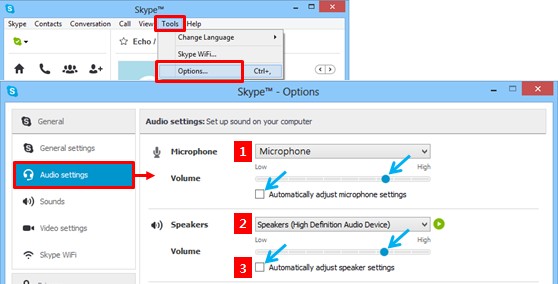
- 1 Select "Microphone" to use/record your voice.
- 2 Select "Speakers" to hear/record your friend's voice.
- 3 Uncheck "Automatically adjust microphone/speaker settings" and increase the volume bar.
Related FAQs
- If you can't record computer sounds, visit HERE
- If you can't record your voice/microphone, visit HERE
More information
- How to Record Skype Calls (PlainTips): http://plaintips.com/how-to-record-skype-calls
- User-created Video (YouTube): Waiting for your video.
» Please share your video on the Bandicam forum: https://forum.bandicam.com/viewforum.php?f=14