The video quality is not clear. There are artifacts on the screen.
Fix unclear Bandicam recordings, screen tearing, clipped video, blurry text, bright HDR recordings, and video quality problems.
[ The screen contains artifacts or is clipped ]
1. There might be a problem with the video playback program.
Try playing the video with other video playback programs such as Windows Media Player or VLC media player.
2. If you see the screen tearing issue like below:

1) Download and install the latest graphics card driver from the manufacturer's website.
- Nvidia: https://www.geforce.com/drivers
- Intel: https://downloadcenter.intel.com/default.aspx
- AMD: https://www.amd.com/en/support
2) If you still have problems, uncheck the 'Use enhanced capture method ' option.

[ The text is not clearly visible ]
1. There might be a problem with the video playback program.
Try playing the video with other video playback programs such as Windows Media Player or VLC media player.
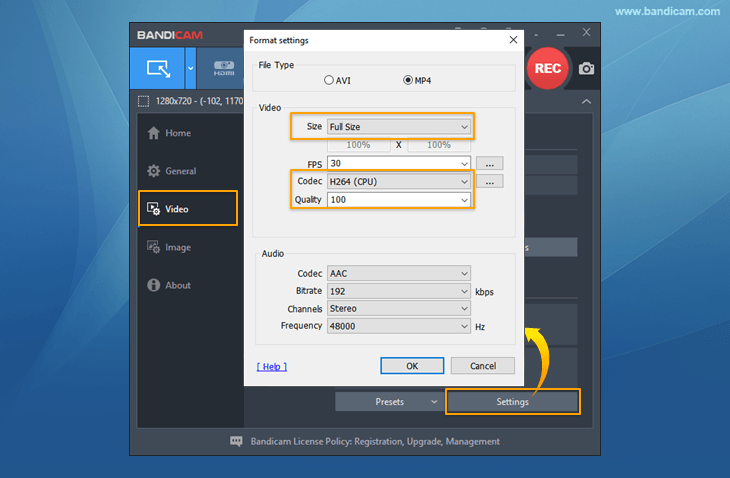
2. Set the “Format settings" of Bandicam to 'Full size, H264, quality value 100' and try recording.
3. If you post the recorded video on Facebook or YouTube, the text may be corrupt.
Even if the video on your computer looks clear, if you share it on Facebook / YouTube, the text on the website may become rearranged during the conversion process. To share a video without breaking the text, we recommend sharing the original video using services such as 'Google Drive, Microsoft OneDrive.'
[ The recorded video is too bright ]

1. There might be a problem with the HDR option in Windows 10.
If you use 'Screen Recording Mode,' download Bandicam 6.2.1 or higher versions and try again.
If you use 'Game Recording Mode,' turn off the HDR option in the display settings of Windows and try again.
2. There might be a problem with the codec or your media player.
Try another video player such as Windows Media Player, VLC Player, or KM Player.
[ How to Increase Your Video Quality ]
Once you've got Bandicam software installed on your computer, all you need to do is go to the video format settings of Bandicam and increase the video quality value from 80 to 100. It allows you to get the best video quality.
If following the above instructions does not solve the problem, please send the video file to bandicam@bandicam.com.
FAQs
- Why does my recorded video have screen tearing, artifacts, or clipped areas?
- Try playing the video in another media player first, then update the graphics driver and adjust Bandicam's video codec or recording settings. If the issue is related to screen tearing or HDR, update Bandicam or change the display/HDR settings.
- Why is text blurry in my recorded video?
- Play the recording in another media player and set Bandicam's format settings to Full size, H264, and a high quality value such as 100. For online uploads, use a high enough resolution and bitrate to keep text sharp.
- Why is my recorded video too bright?
- For Screen Recording mode, install Bandicam 6.2.1 or later if HDR causes brightness problems. For Game Recording mode, turn off HDR in Windows display settings or in the game, then record again.
- How can I improve the quality of my recorded video?
- Open Bandicam's video format settings and use Full size, H264, and a higher quality value such as 100. If quality is still low, increase the recording resolution or bitrate and check the related video quality guide.