The video and audio are out of sync; the sound is faster/slower than the video
Fix Bandicam audio and video sync problems in screen, webcam, and capture card recordings by adjusting codecs, devices, and settings.
How to fix audio and video sync problems
Solutions for audio and video sync problems
1. Download/install the latest version. Then, choose the MP4 container and "H264 + AAC" codec.
- Use a hardware-accelerated H264 (NVIDIA, Intel, AMD) video codec.
- If you have a problem with the hardware-accelerated video codec, try the H264 (CPU) codec.

2. Reset all Bandicam settings and try again.
- If the output folder is set to an external USB disk drive, OneDrive, or Google Drive, sync problems may occur.

3. Download/install the latest graphics card driver from the manufacturer's website.
- Nvidia: https://www.geforce.com/drivers- Intel: https://downloadcenter.intel.com/default.aspx
- AMD: https://www.amd.com/en/support
4. After reinstalling the sound card driver, try recording.
If you are still having problems, try the case-by-case solutions below.
Case 1: The audio is out of sync in [Screen recording mode]
1. "Check" or "Uncheck" the "Use enhanced capture method" option.

2. If the microphone is out of sync, check the "Listen to this device" option.

- Select "(Default Output Device)" for the Speakers and "Disable" for the Microphone in the Bandicam Recording settings.
- Go to the Recording tab, right-click on Microphone, and select Properties.
- Check the "Listen to this device" option, and try recording.
Case 2: The audio is out of sync with a webcam
If you've recorded a webcam and the audio is out of sync, try following the steps below.
1. Download/install the latest webcam driver from the manufacturer's website.
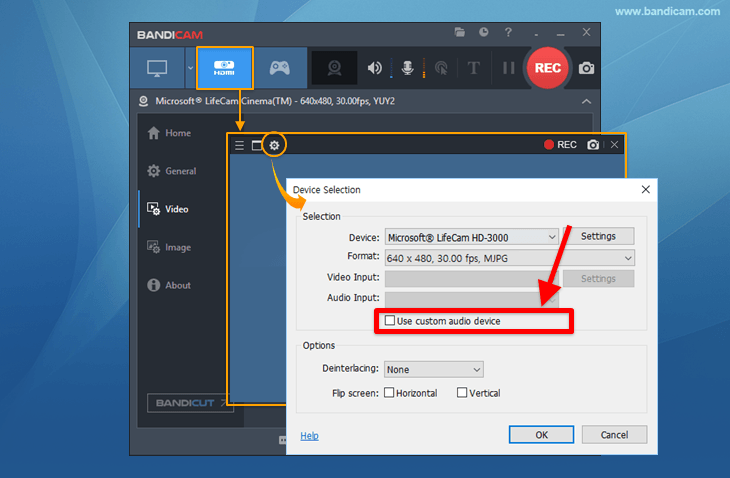
2. Uncheck the "Use custom audio device" option in [Device Recording Mode].
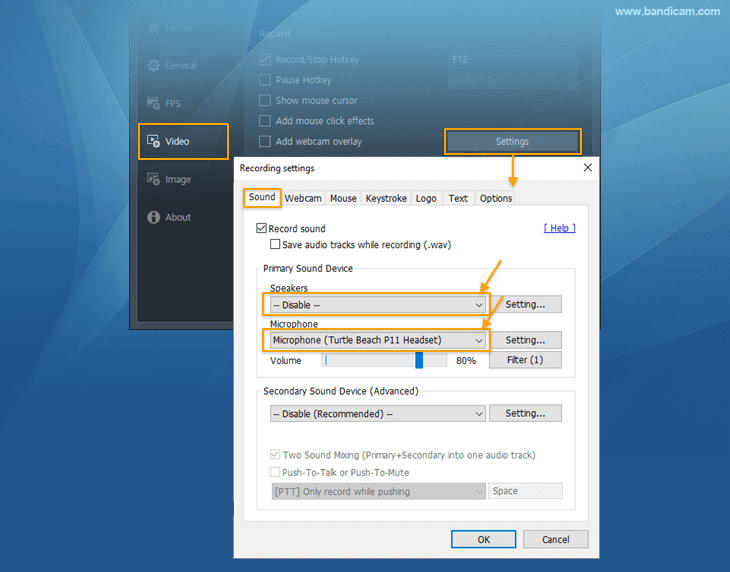
3. Select your microphone device in the Recording settings.
Case 3: The audio is out of sync with a capture card (board)
If you've recorded a capture card (board) and the audio is out of sync, try following the steps below.
1. Download/install the latest capture card driver from the manufacturer's website.
2. Choose Device Recording Mode and uncheck the "Use custom audio device" option.
3. Go to the [Recording settings] of Bandicam, and select "(Default Output Device)" for the Speakers and "Disable" for the Microphone. Then, go to the [Recording] tab of Windows, right-click on your capture card device, select Properties, and check the "Listen to this device" option.
4. Try selecting a different format, such as MJPG or YUV2, instead of H264.

If the above method does not solve the audio sync problem, please record or screenshot your Bandicam and Windows sound settings, and send the respective video or image file to bandicam@bandicam.com
FAQs
- How do I fix audio and video sync problems in Bandicam?
- Install the latest Bandicam version, use the MP4 container with H264 and AAC, and try either a hardware-accelerated H264 encoder or H264 (CPU). Lowering recording settings and updating device drivers can also help reduce sync issues.
- How do I fix audio delay in Screen Recording mode?
- Toggle the enhanced capture method option and test again. If microphone audio is delayed, adjust the Windows Listen to this device setting or select the speaker and microphone devices directly in Bandicam.
- How do I fix audio sync issues when recording a webcam?
- Install the latest webcam driver, uncheck the custom audio device option in Device Recording Mode, and select the microphone or audio device directly. Test again after confirming the webcam and audio device are using the latest drivers.
- How do I fix audio sync issues when recording a capture card?
- Install the latest capture card driver, use Device Recording Mode, and uncheck the custom audio device option if needed. Select the capture card audio source or microphone directly and test again.