How to use Nvidia NVENC encoder - H264, HEVC, AV1
- If you use a high-end NVIDIA graphics card and install the latest NVIDIA graphics card driver, you will be able to enhance the recording ability of Bandicam by using the GPU of the graphics card.
- If you use GTX 600 series or higher graphics cards, you will be able to use the Nvidia NVENC H264 encoder which allows you to record the target with high speed, high compression ratio, and excellent quality.
- If you use GTX 950 series or higher graphics cards (Maxwell, GM20x), you will be able to use the Nvidia NVENC HEVC(H.265) encoder which is better at compression than the NVENC H.264 encoder.
- If you use GeForce RTX 40 series graphics cards, you will be able to use the Nvidia NVENC AV1 encoder which is better at compression than the NVENC HEVC and H.264 encoder.
AV1, HEVC, H.264 - Which one is better?
AV1 or HEVC (H.265) is better at compression than H.264. The video quality of AV1/HEVC will be better than H.264 if the file size is the same. The file size of AV1/HEVC is smaller than that of H.264 if the video quality is the same.
However, some media players don't support AV1/HEVC and AV1/HEVC uses more CPU than H.264.
Users have to choose the proper codec to meet their needs.
AV1, HEVC and H.264 - Size, Quality, and Speed
The table below shows the file size, video quality, and codec speed.
| Codec | Size | Quality | Speed | Description |
|---|---|---|---|---|
| AV1 | 15.1 MB  |
Better |
Fast |
Better compression rate than HEVC and H.264 » How to play AV1 videos |
| HEVC | 29.8 MB |
Better |
Fast |
Better compression rate than H.264 for the same picture quality |
| H264 | 31 MB |
Better |
Fast |
Best codec for most users |
(Recording time: 1 minute, Video resolution: 1920x1080, FPS: 30, Quality: 80) » Comparison of video codecs
To use the Nvidia NVENC encoder, please follow the steps below:
-
Download/install the latest Nvidia video card driver
- Go to https://www.geforce.com, and download/install the latest Nvidia video card driver.
- Download Nvidia Driver: https://www.geforce.com/drivers
-
Choose the "H264 (Nvidia® NVENC)", "AV1 (Nvidia® NVENC)" or "HEVC (Nvidia® NVENC)" option.
- Click the Settings button under the Video tab, then choose the "H264 (Nvidia® NVENC)", "AV1 (Nvidia® NVENC)" or "HEVC (Nvidia® NVENC)" encoder.
- H264/HEVC is one of the most commonly used formats for the recording, compression, and distribution of high definition videos. (View the comparison of video codecs of Bandicam)

- Profile: If you choose "H264 (NVIDIA® NVENC)," the Profile selection menu (Auto, Main, High) will be shown.
- VBR (Variable bitrate) - Quality-based: VBR allows a higher bitrate for faster scenes and a lower bitrate for slower scenes, as a result, the recorded video size can be made smaller. (Recommended)
- CBR (Constant Bitrate) - Bitrate-based: CBR always uses the same bitrate, as a result, you can predict the video file size (But, the recorded video size might be larger.)
- GPU device: If you use more than 2 GPUs, try this option. (For example, use graphic card A for recording and graphic card B for gaming.)
- Keyframe interval: If the Keyframe Interval is set to 150, keyframes will be created every 150 frames.
- FourCC code: To play the recorded video on media players, choose "H264." To edit the recorded video with Sony Vegas, Adobe Premiere with the AVI container, choose "X264." » See more
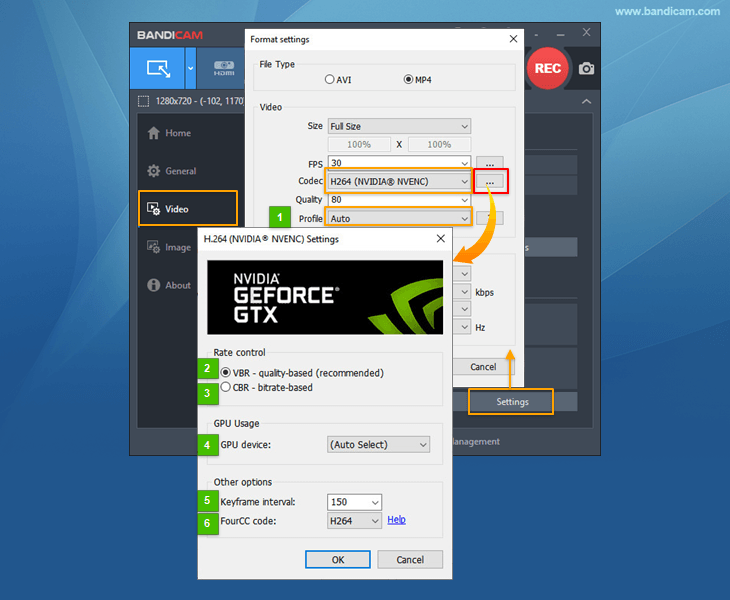
If you cannot see the "H264 (Nvidia® NVENC)", "AV1 (Nvidia® NVENC)" or "HEVC (Nvidia® NVENC)" option, please try the solutions below:
-
Nvidia® NVENC encoder is available in Windows 7, 8, 10 and 11.
If you use 'Windows XP' or 'Windows Vista', the "H264 (Nvidia® NVENC)" menu will not be shown.
-
Update your graphics card driver.
Download the latest Nvidia video card driver from https://www.geforce.com/drivers
-
Check whether your computer has an NVENC-capable GPU
* H264 (Nvidia® NVENC)
- Desktop GPU: Geforce GTX 600 series, QUADRO/TESLA(K series) or higher graphics cards.
- Laptop GPU: GTX 660M, 670MX, 675MX, 680M, 700M or higher graphics cards.
* HEVC (Nvidia® NVENC)
- Desktop GPU: Maxwell GM20x (GTX 950/960/970/980/Titan X), Pascal GP10x (GTX 1030/1050/1060/1070/1080/Titan X), QUADRO/TESLA(M/P series) or higher graphics cards.
- Laptop GPU: GTX 965M, 970M, 980M or higher graphics cards.
* AV1 (Nvidia® NVENC)
- Desktop GPU: RTX 4060 or higher graphics cards.
- Laptop GPU: RTX 4050, 4060 or higher graphics cards.
-
Nvidia® NVENC encoder is available with the latest version of Bandicam.
Nvidia® NVENC H.264 encoder is available from Bandicam 2.0.0, Nvidia® NVENC HEVC encoder is able from Bandicam 2.4.0, and Nvidia® NVENC AV1 encoder is able from Bandicam 7.0.1 with the MP4 file type.
Error message: Failed to initialize codec.
If your computer is out of memory or the NVENC codec is being used by another program, you will see the "Failed to initialize codec" error message. Additionally, on NVIDIA RTX 50 series cards, hardware acceleration (NVENC) is not supported in older 32-bit (DX9) games due to architectural changes.
To solve this problem, please try the following:- Close unnecessary programs: Close other programs that might be using the GPU or consuming memory and try again.
- Use another hardware codec: If available, select H.264 (Intel Quick Sync) or H.264 (AMD VCE/VCN) in the Bandicam settings.
- Use a software codec: Change the video codec to H.264 (CPU) or Xvid.
- Use Screen Recording Mode: If the error persists in 'Game Recording' mode, please use 'Screen Recording' mode to capture your gameplay.
GPU Hardware Acceleration Support
| Nvidia NVENC | Intel Quick Sync Video | AMD VCE/VCN | |
|---|---|---|---|
| OS | Windows 7/8/10/11 | Windows 7/8/10/11 | Windows Vista, 7/8/10/11 |
| Bandicam | v2.0.0/v2.4.0 or higher | v1.9.0/v3.1.1 or higher | v1.9.1 or higher |
| Hardware Acceleration | AV1, HEVC, H264 | AV1, HEVC, H264 | AV1, HEVC, H264 |
| Graphics card | GTX 600 or higher / HEVC: GM20x GPU | i3, i5, i7 processors / HEVC: Skylake GPU | HD 7700 or higher |
| Video resolution | No limitations (4K Recording, 3840x2160) | Haswell: 2560x1600, Pre-Haswell: 1920x1200 | 1920x1080 |
| Description |  |
 |
 |
Last Updated on