Try Bandicam Screen Recorder!
Download Bandicam (Free)How to Blur Your Screen While Recording
The latest version of Bandicam, Bandicam 2025, has added a blur feature. If you want to hide people’s faces or personal information such as vehicle license plates, account numbers, or passwords while recording your screen, you can use the blur feature to hide parts of your screen and record.
How to Blur Parts of Your Screen While Screen Recording

With Bandicam Screen Recorder, users can easily blur out any part of their screen while recording. Follow the steps below to start using the blur effect feature:
Download and start Bandicam Screen Recorder.
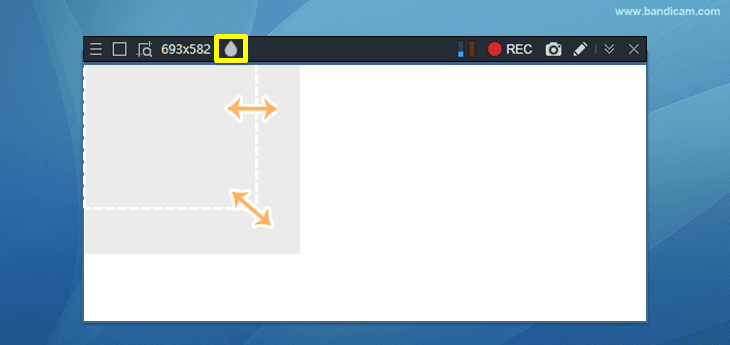
Choose the 'Select a recording area' or 'Rectangle on a screen' option, and click on the blur icon.
![add blur effect]()
Freely adjust the size and position of the mosaic overlay.
- You can adjust the size by placing the mouse cursor on the corner of the mosaic overlay.
- You can move the position by clicking and holding the mouse in the center of the mosaic overlay.
![Adjust mosaic overlay size]()
![move mosaic overlay]()
Now, you can start recording by pressing the ● REC button and finish by clicking the ■ stop button.
Even while recording, you can add or remove the mosaic overlay by clicking the blur icon.
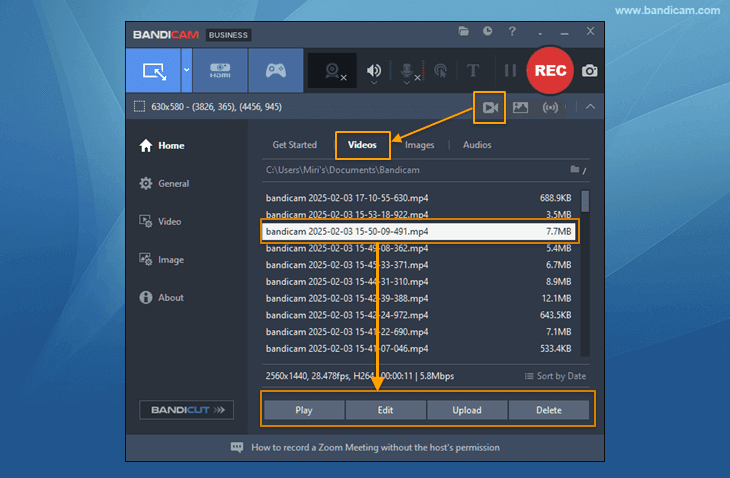
Click the video icon to Play, Edit, or Upload the recorded video to YouTube or Google Drive.
![recorded videos]()

Additional Tip: Add Mosaic While Recording Fullscreen
In Fullscreen mode, the control bar appears for three seconds when the mouse is at the top of the screen. Click on the blur icon in the control bar to hide parts of your screen while recording.

Frequently Asked Questions
1. What if the blur overlay effect appears black for me?
If you enable Transparency Effects (found in Windows Personalization -> Colors Settings), the blur overlay effect will appear semi-transparent.

2. Can I add blur effects in Device/Game Recording mode?
You can use blur effects only in Screen Recording mode -> Rectangle on a screen or Fullscreen.

Last Updated on