Bandicam Screen Recorder Review – A Simple And Efficient Screen Recorder To Try In 2018
October 3, 2018 | Furqan Shahid from twitgoo.com « News / Review list

That leaves us with a plethora of options available in the market that we can effectively make use of. The good news here is that today, we are reviewing what is most probably one of the best screen recording softwares. In case you are wondering, I am talking about Bandicam Screen Recorder — I have been using it for a while, and it has become the top software that I use over everything else. Today, I am going to be reviewing it, and explaining to you why it has become such a sensation in the market that is already overcrowded by so many alternatives.
Before I begin my review, I have to tell you that although Bandicam is a paid software, the free version has almost all the important features you would need. These features will help you make the proper decision as to whether you should buy Bandicam or not. In a world where companies are trying to get as much money from the consumers as possible, Bandicam is actually doing something positive, and I actually admire that.
Bandicam Screen Recorder Features
Bandicam as a screen recorder and capture software is full of features that many people can effectively put to use. That being said, I am taking a look at the highlighted features of Bandicam below so people can have a better understanding. So, let’s not waste time and have a look, shall we?Screen Recording
If you want to record some tutorial on the screen, Bandicam is a great option that allows you to easily record the screen and without any issues either. You can select the area you want to record, and even choose to record the audio along with it if you want to make everything a lot more authentic and easier for the viewers.Game Recording
Most recording software use the same parameters for screen recording, and game recording. However, with Bandicam, the process is entirely different, and that is for the better. With Bandicam, you can effectively record your gameplay videos without having any major impact on your frame rate.Device Recording
Another amazing Bandicam feature is device recording, this is for people who want to be able to record the externally connected devices with ease. If you want to record your webcam, IPTV, or even Xbox, then Bandicam is the way to go.Screenshots
Another feature that I love about Bandicam is the fact that we can actually take screenshots with great ease. You will even get a counter on the screen that changes color whenever you take a screenshot. This is really convenient for people who prefer taking screenshots of the games they play.How to Use Bandicam
Considering how Bandicam is a multi-purpose screen recording software, there are several ways you can use that. The emphasis here is on screen recording, so that is what we are going to be looking at right now.Once you have downloaded and installed the software, you can follow the tutorial below that will help you use the software without any issue whatsoever.
Step 1: Launch Bandicam, and click arrow next to the monitor. From there, you can choose between full screen, rectangle, or around the mouse.
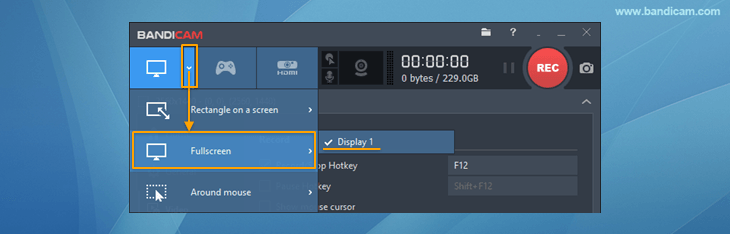
Step 2: Once you have done that, simply click on the record button and the process will start for you.

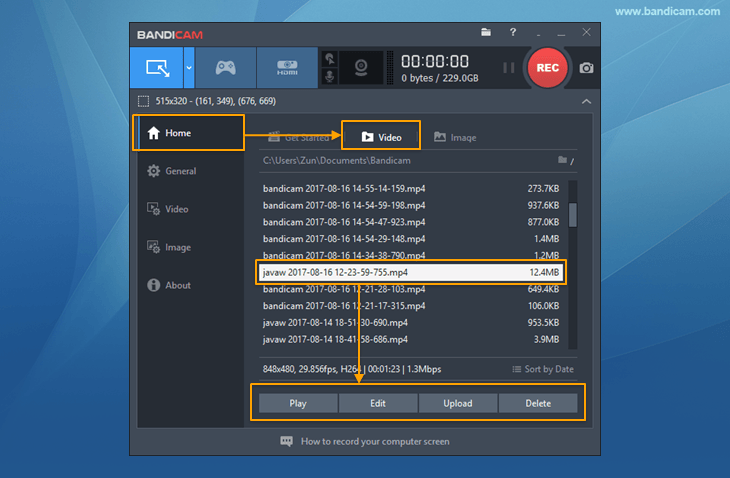
Step 3: Once the video is recorded, you can go ahead and stop the process of recording, and then, later on, you can view the video that you have recorded for ease and convenience.
How to Use Game Recording Mode
Considering how Bandicam boasts an impressive game recording feature too, using it is a great option for all the gamers looking to record their footage. The process itself is simple and similar to the screen recording method. Still, if you do require proper guidance, you can have a look at it below.Step 1: if Bandicam is not already running, simply launch the program, and choose the game recording mode that is next to the screen recording.
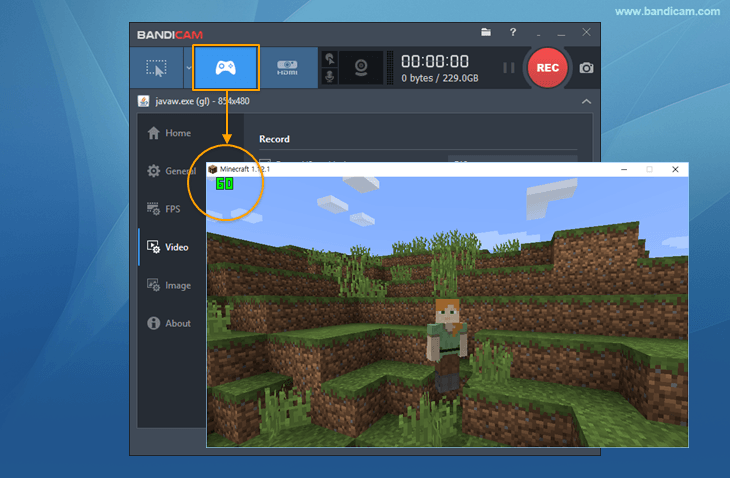
Step 2: If the game you are planning on the recording is already running, you should see a green FPS counter on the top left, or at the place, you have selected. If not, then run the game, and you will see that. To begin recording, simply press F12 and click on the REC button and you would be good to go. Once the recording starts, the green FPS counter will turn red.
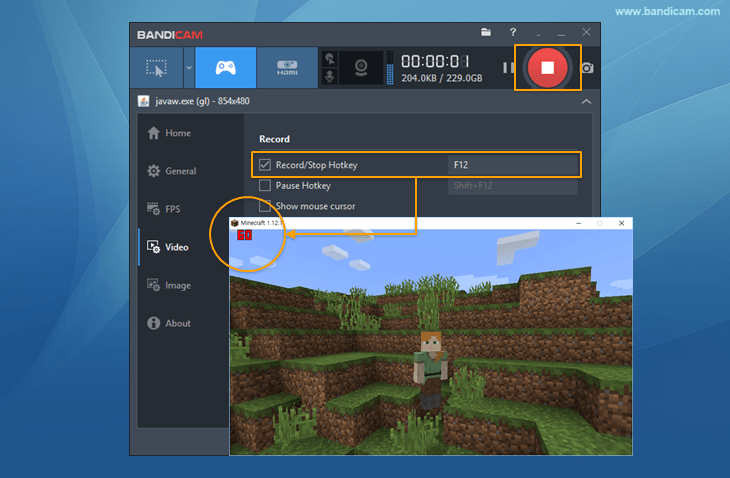
Step 3: Once you are done recording, all you need to do is simply make sure that you click the stop button, or if not that, then press F12 again and the recording will stop right there, and the FPS counter will turn green once again.
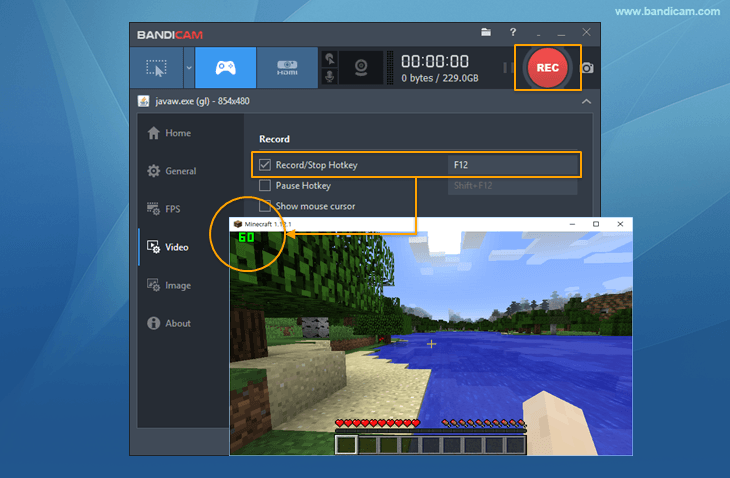
Step 4: Whenever you want to view your recorded video, simply click Home on the left pane, and see the video that you have recorded.
How to Use Device Recording Mode
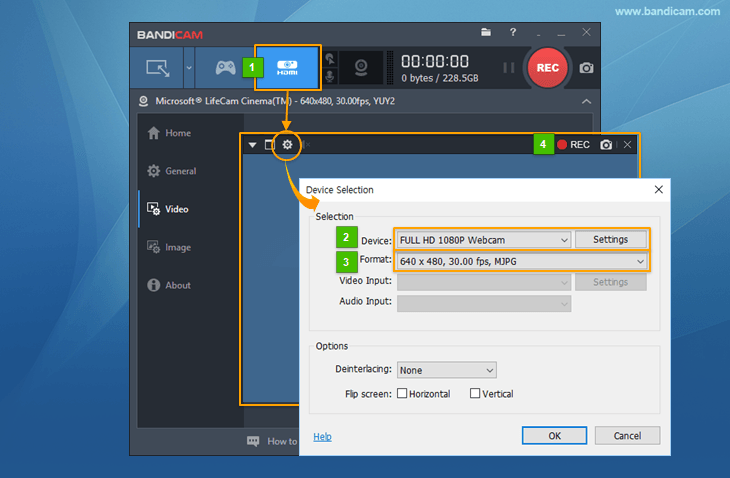
If you want to record an external device connected to your computer, the process for that is available too and is rather easy. Let’s have a look at it below.Step 1: Launch Bandicam and click on the HDMI icon.
Step 2: Once that is done, choose the device you want to record from, and then choose the format you want the video in. To make the experience better, you can even choose the video input, as well as audio input in order to have everything available at one place.
Step 3: Press OK once everything is set, and then hit the recording button to start the recording. The entire process is simple as that and should work well if you are looking to effectively record something from your device.
Final Thoughts
Now comes the conclusion time. Generally, whenever I use a screen recording software, I am often met with some disappointments along the line. Remember how I told that most of the times, most of the screen recorders combine all the recording features into one and call it a day, the good thing about Bandicam is that it works differently as compared to some of the other options available in the market.Here, all the recording features are separated; which means that there is a separate tab for screen recording, game recording, as well as device recording, and this attention to detail makes Bandicam one of the best software available in the market. Since we are on the topic of recording, the one thing that stands out the most is how whenever you are recording footage of a video game, you do not see any frame rate drop. This has been a common problem in the majority of screen capture programs that have been in the market for some time now, and I am pleased to introduce that such an issue does not exist with Bandicam at all. Whether you are running a demanding game like PUBG, or something as simple as Minecraft, as long as your PC supports it, you will have absolutely no issue whatsoever with recording the game.
In conclusion, for anyone who is looking for an all in one solution to the screen recording woes that they face on a regular basis, the Bandicam is the go-to solution to all the issues that you might be facing. Sure, the software is paid, but the free version is just as good and works in all the situations as well. If you think you are going to need all the features there are, then investing in a paid version is definitely a good decision.
Pros
- Bandicam provides you with a plethora of options that you can use for recording videos, as well as taking screenshots.
- The software is easy to use with every feature having its separate section, but the same working procedure.
- The free version offers almost all the features you would get in the paid version.
- The game recording does not take a toll on the frame rate of the game.
- The software is capable of running on nearly every computer.
Cons
- During my review, I did not run into any issue.

Other Bandicam reviews
-
Bandicam Introduces Browser-Based Free Online Screen Recorder
March, 2026 / prweb.com -
 The new Bandicam browser-based screen recorder supports Windows, macOS, and Linux.
- Read more»
 The new Bandicam browser-based screen recorder supports Windows, macOS, and Linux.
-
Bandicam for Mac Adds Real-Time Annotation and Cloud Sharing
March, 2026 / prweb.com -
 The update focuses on minimizing post-production steps, and allowing seamless video distribution.
- Read more»
 The update focuses on minimizing post-production steps, and allowing seamless video distribution.
-
Bandicam Update with Selective Audio Recording from Specific Apps
July, 2025 / EINPresswire.com -
 New feature enables app-specific audio capture and introduces an auto-hiding main window for streamlined recording area selection.
- Read more»
 New feature enables app-specific audio capture and introduces an auto-hiding main window for streamlined recording area selection.
-
Bandicam Upadte with Automatic Recording Area Detection
August, 2025 / EINPresswire.com -
 The latest update refines recording precision, expands creative webcam options, and improves blur tool usability for users.
- Read more»
 The latest update refines recording precision, expands creative webcam options, and improves blur tool usability for users.
-
Bandicam Launches Its Official Screen Recorder for Mac
July, 2025 / EINPresswire.com -
 Bandicam is now available for Mac! Record everything on your mac screen in high definition—from games and lectures to webcam feeds.
- Read more»
 Bandicam is now available for Mac! Record everything on your mac screen in high definition—from games and lectures to webcam feeds.
-
Bandicut Adds Multi-Video Editing and Batch Conversion
May, 2025 / EINPresswire.com -
 The new update introduces powerful features enabling simultaneous cutting, merging, and batch conversion of multiple videos.
- Read more»
 The new update introduces powerful features enabling simultaneous cutting, merging, and batch conversion of multiple videos.
-
Detect Keyboard and Mouse Movements for Screen Recording
January, 2025 / EINPresswire.com -
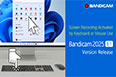 The Bandicam update offers an Auto-Pause Recording feature, making screen monitoring more efficient by recording only when the keyboard or mouse is in use.
- Read more»
 The Bandicam update offers an Auto-Pause Recording feature, making screen monitoring more efficient by recording only when the keyboard or mouse is in use.
-
Bandicut 2025 Update Adds More Speed Controls and Video Rotation
December, 2024 / EINPresswire.com -
 With accurate slow-motion playback changes and a variety of rotation and flip options, the most recent Bandicut version improves video editing.
- Read more»
 With accurate slow-motion playback changes and a variety of rotation and flip options, the most recent Bandicut version improves video editing.
-
Bandicam 2025 Update with Enhanced Drawing and Blur Feature
November, 2024 / EINPresswire.com -
 Enjoy a better screen recording experience with the new blur and whiteboard features in the updated Bandicam 2025.
- Read more»
 Enjoy a better screen recording experience with the new blur and whiteboard features in the updated Bandicam 2025.
-
Bandicut Launches New Timestamp-Saving Feature for YouTubers
October, 2024 / EINPresswire.com -
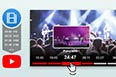 Content creators can now save timestamp information as a text file thanks to Bandicut’s innovative software that just keeps evolving.
- Read more»
 Content creators can now save timestamp information as a text file thanks to Bandicut’s innovative software that just keeps evolving.
-
Bandicam Update with Webcam Rotation and Screen Recording selection
April, 2024 / EINPresswire.com -
 Users can smoothly transition between portrait and landscape configurations by adjusting their camera feed to 90, 180, or 270 degrees.
- Read more»
 Users can smoothly transition between portrait and landscape configurations by adjusting their camera feed to 90, 180, or 270 degrees.
-
Multi-Monitor Screen Recording at Scheduled Times
February, 2024 / EINPresswire.com -
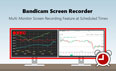 Bandicam allows users to record multiple displays simultaneously at preset times and opt to exclude Bandicam windows from recordings.
- Read more»
 Bandicam allows users to record multiple displays simultaneously at preset times and opt to exclude Bandicam windows from recordings.
-
AV1 Video Encoding for Nvidia, Intel, and AMD
November, 2023 / EINPresswire.com -
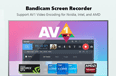 Bandicam Screen Recorder 7.0.1 supports the AV1 video codec with Nvidia, Intel, and AMD GPUs and offers improved sound control.
- Read more»
 Bandicam Screen Recorder 7.0.1 supports the AV1 video codec with Nvidia, Intel, and AMD GPUs and offers improved sound control.
-
10 Best Video Splitter Software to Cut Footage into Smaller Clips
2023 / Geekflare -
 Whether you are a YouTuber working or a Videographer busy editing a documentary, you may need to split video.
- Read more»
 Whether you are a YouTuber working or a Videographer busy editing a documentary, you may need to split video.
-
Record a Specific window in Background
October, 2023 / 24-7PressRelease -
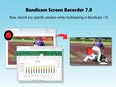 Bandicam can now record any specific window while working on multiple program windows simultaneously, giving them an unparalleled user experience.
- Read more»
 Bandicam can now record any specific window while working on multiple program windows simultaneously, giving them an unparalleled user experience.
-
Bandicam Update With Facecam and Keyboard Overlay
April, 2023 / EINPresswire.com -
 With the Bandicam Screen Recording tool, users can display keystrokes on their screens and adjust webcam PIP size or location while recording.
- Read more»
 With the Bandicam Screen Recording tool, users can display keystrokes on their screens and adjust webcam PIP size or location while recording.
-
Bandicam Updates With AV1 Codec and HDR Recording Support
March, 2023 / EINPresswire.com -
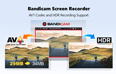 Bandicam has unveiled a significant platform update which comes with notable advancements such as support for the AV1 codec and HDR monitor recording.
- Read more»
 Bandicam has unveiled a significant platform update which comes with notable advancements such as support for the AV1 codec and HDR monitor recording.
-
Bandicam New Update with Google Drive Upload Feature
December, 2022 / EINPresswire.com -
 Bandicam Screen Recorder has released a new update that allows users to upload their videos directly to Google Drive, as well as YouTube.
- Read more»
 Bandicam Screen Recorder has released a new update that allows users to upload their videos directly to Google Drive, as well as YouTube.
-
Bandicam Screen Recorder 6.0 allows users to record only the audio
June, 2022 / EINPresswire.com -
 Bandicam 6.0 allows users to record audio for over 24 hours and improves the mouse highlighter feature by adding opacity controls to conceal objects and identities.
- Read more»
 Bandicam 6.0 allows users to record audio for over 24 hours and improves the mouse highlighter feature by adding opacity controls to conceal objects and identities.
-
Change Facecam shapes and Show countdown timer
April, 2022 / EINPresswire.com -
 The latest version of Bandicam 5.4 has recently been released with major upgrades, now allowing users to change Facecam shapes and show the countdown timer.
- Read more»
 The latest version of Bandicam 5.4 has recently been released with major upgrades, now allowing users to change Facecam shapes and show the countdown timer.
-
Bandicam New Version Allows Users to Record DirectX 12 Games and BlueStacks
December, 2021 / EINPresswire.com -
 Bandicam has just released a new version of their game recorder. The latest version, Bandicam 5.3.3, helps users record DirectX 12 games and even BlueStacks.
- Read more»
 Bandicam has just released a new version of their game recorder. The latest version, Bandicam 5.3.3, helps users record DirectX 12 games and even BlueStacks.
-
Bandicam Releases New Version that Allows Users to Add Recording Date, Time, and More
November, 2021 / EINPresswire.com -
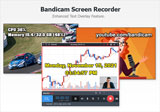 Bandicam has released the latest version of their app with more improvements. In addition, several time stamp information can now be displayed.
- Read more»
 Bandicam has released the latest version of their app with more improvements. In addition, several time stamp information can now be displayed.
-
Top 6 Best Free Video Trimmer for Desktop & Online
October, 2021 / Bandicam Company -
 Video editing takes a surprising amount of work: using a professional program, cutting your initial movie into smaller segments, and merging several files into a single clip might take days. It is essential to find a suitable lightweight program that supports trimming features.
- Read more»
 Video editing takes a surprising amount of work: using a professional program, cutting your initial movie into smaller segments, and merging several files into a single clip might take days. It is essential to find a suitable lightweight program that supports trimming features.
-
Bandicam Screen Recorder Allows Users To Record Zoom Meetings Without Administrator Privileges
October, 2021 / Bandicam Company -
 Bandicam is one of the top screen recording software that has been trending these days. Users can record Zoom meetings without having administrator privileges.
- Read more»
 Bandicam is one of the top screen recording software that has been trending these days. Users can record Zoom meetings without having administrator privileges.
-
Bandicam Releases 64-bit Windows 11 Compatible Version
July, 2021 / Bandicam Company -
 Bandicam company, which specializes in developing and selling PC software, has now released a 64-bit version that works on both Windows 10 and Windows 11.
- Read more»
 Bandicam company, which specializes in developing and selling PC software, has now released a 64-bit version that works on both Windows 10 and Windows 11.
-
Bandicam Launches 64 Bit Version of Bandicut Video Cutter
June, 2021 / Bandicam Company -
 The developer of Bandicam has recently released Bandicut 3.6. 64-bit native version, this new video editor program comes with a high-speed video function, and an amazing user interface as well.
- Read more»
 The developer of Bandicam has recently released Bandicut 3.6. 64-bit native version, this new video editor program comes with a high-speed video function, and an amazing user interface as well.
-
List of top 10 Video Editing Software for beginners
February, 2021 / webdew.com -
 It is one of the another video trimmer and video splitter software that helps you create amazing videos quickly and easily. Due to its easy to use interface, it becomes easy for the people to trim the videos and make it more professional.
- Read more»
 It is one of the another video trimmer and video splitter software that helps you create amazing videos quickly and easily. Due to its easy to use interface, it becomes easy for the people to trim the videos and make it more professional.
-
Bandicam Screen Recorder increasing technical support in response to covid 19 pandemic
November 02, 2020 / PRWeb.com -
 Bandicam is the top leader in the field of game recording software market. The company has been doing phenomenal work so far and now they have increased the technical support as they offer efficient screen recording program.
- Read more»
 Bandicam is the top leader in the field of game recording software market. The company has been doing phenomenal work so far and now they have increased the technical support as they offer efficient screen recording program.
-
The 5 Best Screen Recording Software Tools
April 27, 2020 / Launchberg.com -
 Bandicam lets you record everything that’s happening on your PC screen with crisp, high-quality visuals. If you wish to, you may also record a small portion of the screen. You can capture video from devices such as web cameras, smartphones, Xbox consoles, and more. You can even schedule screen recordings at a specific time of the day or week.
- Read more»
 Bandicam lets you record everything that’s happening on your PC screen with crisp, high-quality visuals. If you wish to, you may also record a small portion of the screen. You can capture video from devices such as web cameras, smartphones, Xbox consoles, and more. You can even schedule screen recordings at a specific time of the day or week.
-
7 best game recording software for low-end PCs
March 30, 2020 / windowsreport.com -
 Bandicam is featured in our earlier game recording software guides and makes an appearance here as well. It is a game recording software that offers 4K UHD recording at 144 FPs. The tool can be used to record anything on your screen and not just games.
- Read more»
 Bandicam is featured in our earlier game recording software guides and makes an appearance here as well. It is a game recording software that offers 4K UHD recording at 144 FPs. The tool can be used to record anything on your screen and not just games.
-
Bandicam Review - Schedule your recording, Don’t just record, ‘drecord’!
October 09, 2019 / eBool.com -
 Have you ever drecorded a video? So far, you might have merely recorded one. Drecording happens when you draw on the screen and record it simultaneously. Thus, you can say drawing and recording together make up drecording. Do not doubt your vocabulary; it is an extract of some creative mind and has nothing to do with the English vocabulary.
- Read more»
-
The best free screen recorders of 2019
July 16, 2019 / Digitaltrends.com -
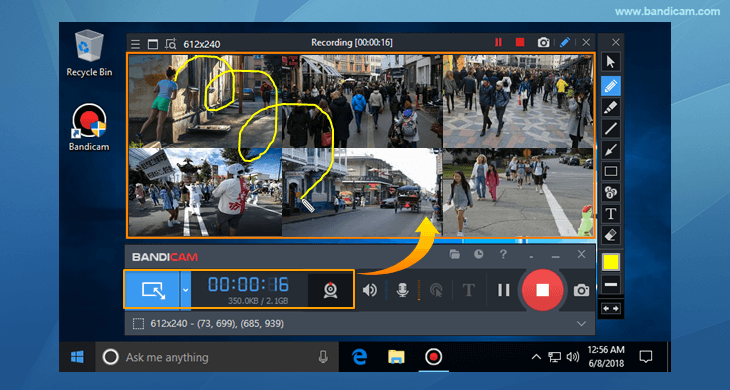 Bandicam’s slick app allows for speedy screen recording with easy-to-use professional features. That includes screen selection for recording, real-time drawing while recording, real-time mic use when recording, and webcam overlays. You can even add your own logo to the video and, if you want, manage a mouse-based soundboard of noises.
There are also many settings specifications for recording from various devices, or for certain types of games.
Bandicam’s slick app allows for speedy screen recording with easy-to-use professional features. That includes screen selection for recording, real-time drawing while recording, real-time mic use when recording, and webcam overlays. You can even add your own logo to the video and, if you want, manage a mouse-based soundboard of noises.
There are also many settings specifications for recording from various devices, or for certain types of games.
- Read more»
 Bandicam’s slick app allows for speedy screen recording with easy-to-use professional features. That includes screen selection for recording, real-time drawing while recording, real-time mic use when recording, and webcam overlays. You can even add your own logo to the video and, if you want, manage a mouse-based soundboard of noises.
There are also many settings specifications for recording from various devices, or for certain types of games.
Bandicam’s slick app allows for speedy screen recording with easy-to-use professional features. That includes screen selection for recording, real-time drawing while recording, real-time mic use when recording, and webcam overlays. You can even add your own logo to the video and, if you want, manage a mouse-based soundboard of noises.
There are also many settings specifications for recording from various devices, or for certain types of games.
-
Bandicam – All in One Solution to Recording Screen, Games & Devices
January 24, 2019 / techiespad.com -
 Bandicam is software that enables the user to capture screenshots and or video recordings of anything on the computer screen. Bandicam captures images and videos with the level of quality of the original display. The performance of Bandicam as screen recording software is beyond any other software that offers similar services. Bandicam makes it easy for users to set their preferences and the default storage location.
- Read more»
-
7 game recording software for YouTube to take your game online
November 30, 2018 / Windowsreport.com -
 YouTube gaming scene has seen a massive rise of 343% in live game streaming in 2017 whereas twitch grew by 197%. While the percentage does not always paint the true picture (because Twitch is still miles ahead of YouTube when it comes to live game streamers and viewers), YouTube gaming scenario has undoubtedly attracted a good number of live game streamers recently.
- Read more»
-
Bandicam Screen Recorder Review – A Simple And Efficient Screen Recorder To Try In 2018
October 3, 2018 / twitgoo.com -
 Screen recording programs have become a lot more common as you might think about them. As far as my memory serves me, Fraps was one of the first recording and capturing software I had used, but sadly, the developers canned that project and never decided to revive it.
- Read more»
-
THE INDIE GAME DEVELOPER’S TOOLKIT, BANDICAM (GAME SCREEN RECORDING)
November 30, 2017 / G2crowd.com -
 The go-to video and screen capture tool for gamers, Bandicam is a great tool for multiple use cases. End users (aka gamers) are able to record their gameplay and upload their adventures to online streaming sites.
- Read more»
-
Bandicam 4.0 is a powerful All in One Recording Software for your computer.
November 06, 2017 / reviews.thewindowsclub.com -
 In today’s world of internet and digital media, people are craving for new technologies to cater their need for customized digital experience in terms of communication, entertainment, learning and many others...
- Read more»
-
Bandicam is reborn as all-in-one, screen-recording software with a more intuitive user interface.
August 24, 2017 / 24-7pressrelease.com -
 Bandicam 4.0.0 is a major update that includes a renewal of the skin design, corresponding with video-creation scenes, and enabling improved productivity when making videos.
- Read more»
-
Game Recording Software Bandicam Review 2017
May 08, 2017 / Wondershare.com -
 Bandicam is a software package that is able to record game play and screen recording videos, all in a lightweight package. With Bandicam, you can record a specific area on a PC, or capture gameplay that uses one of many common graphics technologies.
- Read more»
-
Record video while playing games, working on apps or talking to someone via webcam
Jun 14, 2016 / Softpedia.com -
 If you want to record yourself while playing a game or working in an application to create a video guide or tutorial to post on YouTube, you can check out Bandicam Screen Recorder. It features support for webcam and HDMI device recording.
- Read more»
-
Bandicam Company Announces Bandicam; Record 4K Ultra HD Video and Capture Up To 120 FPS Video
Jul 17, 2014 / prweb.com -
 Bandicam, the worldwide leader in the recording software market, supports 4K video recording and 120 FPS game recording with GPU hardware acceleration.
- Read more»
-
Bandicam Company, the developer of Bandicam, released a new video cutting program called Bandicut.
Feb 4, 2014 / Bandicam Company -
 Bandicut is a very fast video cutting program with an easy to use interface. This program is able to cut videos without encoding, and the user can clip a part of video quickly while maintaining the quality of the original video.
- Read more»
-
Bandicam Company Announces Bandicam with Hardware Acceleration for Video Recording
Dec 05, 2013 / prweb.com -
 Bandicam Company has announced that the new version of Bandicam fully supports the hardware accelerated H.264 video encoders of Intel, NVIDIA and AMD.
- Read more»
-
Record your screen or take snapshots
10 Apr, 2012 / findmysoft.com -
 The quality of the recordings is good, even with a high compression ratio. Bandicam features a compact interface which lets you record or take snapshots of your screen instantly.
- Read more»
-
The New Game tsunami is coming, record your awesome moments with Bandicam, Fraps Alternative software
Dec 11, 2011 / 24-7pressrelease - Bandicam is a good alternative to Fraps because it records not only the DirectX/OpenGL programs like Fraps but also it can record anything on your PC screen including flash/java games.
- Read more»
-
Imagine you are playing an amazingly exciting game on your PC and much to your glory
Apr 18, 2011 / Freedownloadscenter -
Bandicam, unlike most of the products of this sort, offers you a pretty simple interface that won’t leave you in a panic state even if you belong to the “technologically challenged” category.
- Read more»
-
Easy Gameplay Capture with Bandicam
Apr 9, 2011 / Softpedia Review -
With YouTube as host platform, video has gained a top front spot in today’s Internet life. Programs to video capture your movement on the desktop are plenty, but Bandicam stands out through ease of use and simplicity of the options.
- Read more»
-
Video Capture Software: Now Released Globally
Apr 5, 2011 / Thinking Clearly -
 Bandicam has gained global acceptance within 3 months of its release according to a recent report. The reasons for this might not be unconnected with the low computer lag; high quality video recording.
- Read more»
-
Gamers Worldwide Use Newly Released Bandicam to Record Game Play, Post to YouTube
Mar 22, 2011 / San Francisco Chronicle - Bandicam, fully featured and functional video capture software, is taking the gaming world by storm. Bandicam Company released Bandicam globally earlier this year. In less than three months, it has become very popular among online gamers.
- Read more»
-
Record game and desktop with high-quality
Jan 27, 2011 / Brothersoft Review -
 Bandicam is a lightweight program to record game and desktop. You can record a certain area on a PC screen, or a program that uses the DirectX/OpenGL graphics technologies with ease and high quality.
- Read more»