Bandicam Pro Plan
Upgrade to Bandicam Pro for unlimited high-quality video recording and editing.




Yearly
$29.99
Monthly
$9.99
3-day Free Trial
Free vs. Pro Plans for Bandicam on Mac
| Free Version | Pro Version | |
|---|---|---|
| Recording Duration |  Up to 5 minutes |
 Unlimited |
| Video Trimming | X | ✔ |
| No Pop-up Ads | X | ✔ |
| All Recording Modes | ✔ | ✔ |
| 5K 60FPS Recording | ✔ | ✔ |
| Audio Capture | ✔ | ✔ |
| No Watermark | ✔ | ✔ |
Step-by-Step Guide to Purchasing
Install Bandicam from the Mac App Store and open it.
Click "Get PRO" and then select an annual or monthly subscription plan.
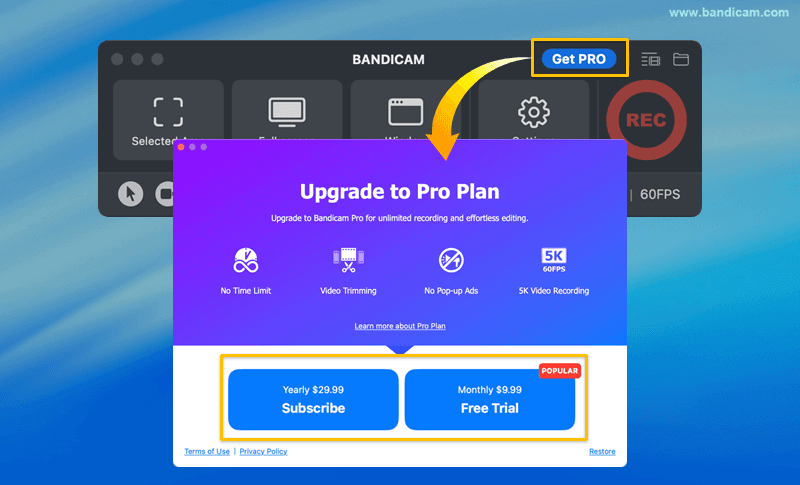
Confirm and complete your purchase.
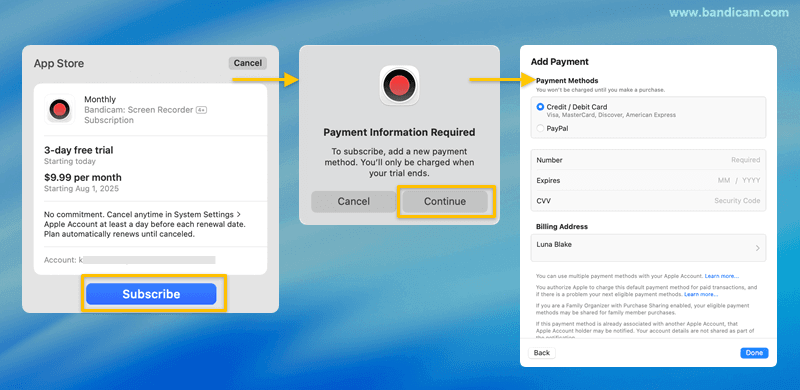
A standard Apple payment sheet will pop up, asking you to confirm the transaction.
- To Subscribe: Authenticate your purchase using your Apple ID password, Touch ID, or Face ID when prompted.
- Payment Information is Required: If you see a "Payment Information Required" message, update your payment method.
- Simply click "Continue."
- Follow the on-screen instructions to add or update your card information.
- Once updated, the purchase will proceed.
![Purchase Bandicam for mac]()