Bandicam for Mac Subscription
This guide provides everything you need to know about Bandicam for Mac’s subscription plans, how to activate your purchase, and how to manage your subscription settings.
Subscription Plans
Choose a plan that works for you. All our subscription plans unlock the full Pro version of Bandicam, giving you access to all features without any limitations, such as recording time limits.
| Annual Plan | Monthly Plan | |
|---|---|---|
| Price | US$29.99 per year | US$9.99 per month |
| Best for | Users seeking long-term, continuous usage at the best value | Testing Pro features or short-term use |
Note: The monthly plan begins with a 3-day free trial, offering full Pro feature access. After the trial, it automatically renews at $9.99/month.
How to Manage Your Subscription
All Bandicam for Mac subscriptions are processed through the Mac App Store, which means you can manage them directly through your Apple ID settings.
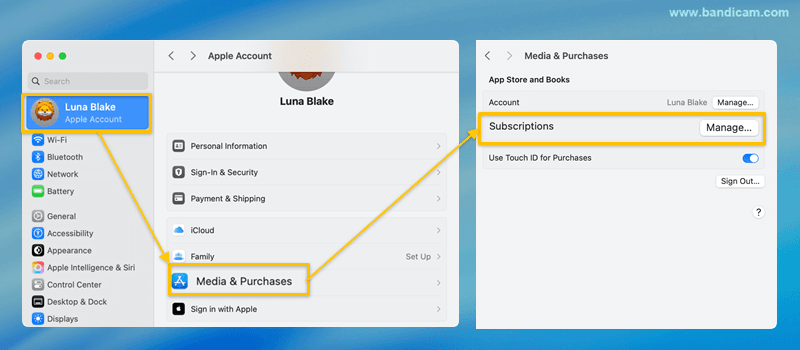
Manage your subscription using the following steps:
- On your Mac, open System Settings, and then click your Apple ID/Name in the sidebar.
- Go to the "Media & Purchases" section.
- Next to "Subscriptions," click the "Manage..." button.
- Here, you will see your Bandicam subscription.
[Refund Policy Information]
Due to Apple's policies, we do not have direct authority to cancel payments or issue refunds.
It is our understanding that refunds are typically processed on a prorated basis for the remaining subscription period upon cancellation; however,
please contact the Apple Support Team for specific details regarding refund procedures and status.
How to Restore Your Subscription
If you have reinstalled Bandicam or are setting up a new Mac computer using the same Apple ID you purchased with, you do not need to buy the plan again. You can easily restore your active subscription.
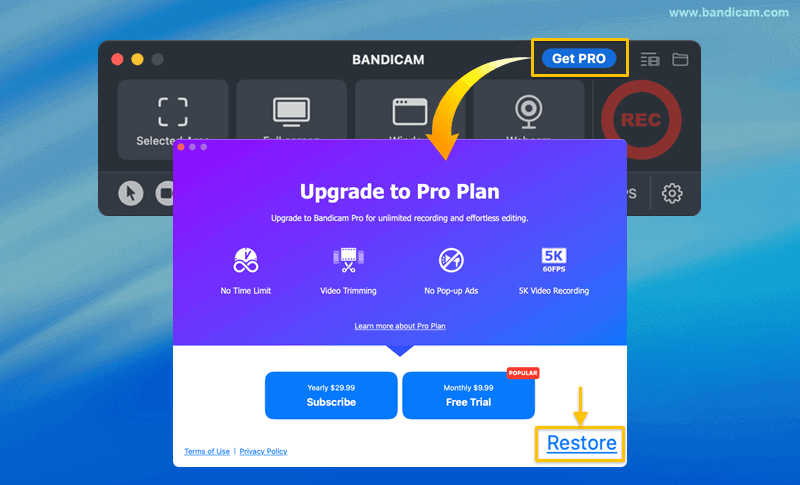
- Install Bandicam from the Mac App Store and open it.
- Click the "Get Pro" button and then the "Restore" button.
- Enter your Apple ID password if prompted. Your Pro subscription will be activated immediately.
» Learn more about restoring your purchase