
An AI chatbot utilizes artificial intelligence to create conversations like humans. Through natural language processing (NLP) and machine learning, it understands user inputs better and creates valuable responses.
AI chatbots can be integrated into websites, voice assistants, etc., to engage users through speech or text. Additionally, their 24/7 availability, quick response, scalability, data collection, and insights capability make them super useful.
Here, we provide the six best AI chatbots and an additional tip for recording all AI conversations.
6 Best AI Chatbots – Features, Price, Pros, and Cons
Get detailed information regarding the top AI chatbots that provide timely responses to human queries:
1. Microsoft Copilot

Microsoft Copilot, owing to its AI capability, allows users to increase their productivity and efficiency. It is one of the best free AI chatbots that comprehensively allows writing, editing, and paraphrasing all in one.
Key Features
- Automates repetitive tasks and enhances productivity
- Equipped with real-time intelligence to complete tasks efficiently
- Visualizes data and tracks project progress
- Writes, edits, and summarizes proposals along with project plans
- Suggests instant action plans during meetings
Price
- Microsoft Copilot in Windows is free for users
- Copilot Pro at $20/month
- Copilot for Microsoft 365 at $30/user/month or yearly package at $360
| Pros | Cons |
|
|
2. ChatGPT

ChatGPT is well equipped as one of the best free AI chatbots for producing human-like responses in real-time according to the user’s input. It converses like another human and solves queries instantly.
Key Features
- Supports multiple languages
- Integrates with Dall-E, an art program related to AI using text descriptions
- Availability of creative controls for training models related to image generation
- Available for numerous uses such as translating, researching, paraphrasing, etc.
- Uses NLP to check user patterns
Price
- Free plan with limited capabilities
- Plus plan at $20/month
- Team plan at $25/month/user billed annually
- Team plan at $30/month/user billed monthly
| Pros | Cons |
|
|
3. Google Gemini

Google Gemini helps synthesize information, identify trends and business opportunities, and more. It is one of the best free AI chatbots for product research, as it can help boost sales and create summaries.
Key Features
- Integrates well with Google apps
- Generates images and designs for presentations
- Drafts personalized replies for emails
- Boosts sales by creating sales pitches, project plans, etc.
- Summarizes documents, word files, and PDFs
Price
- Gemini 1.5 Flash for free
- Monthly plan at $22.80/user/month
- Yearly plan at $19/user/month
| Pros | Cons |
|
|
4. Jasper

Jasper is one of the best AI chatbots for brands. It can match a brand’s tone and style to produce accurate marketing results. Thanks to its browser extension, it can be used anywhere.
Key Features
- Creates captions for social media
- The language interface picks up commands quickly and naturally
- Creates headlines and topic ideas, generates paragraphs, improves content, etc.
- Uses search engine optimization (SEO) capabilities
- Available as a browser extension
Price
- Creator plan at $39/month billed annually
- Teams plan starting from $99/month billed annually
| Pros | Cons |
|
|
5. Perplexity.ai

Perplexity offers the best free AI chatbots made for research purposes. With its standard operation plan, it understands the user’s queries and later compares them with its huge database.
Key Features
- Analyses information quickly to provide fast responses
- Answers complex queries with great understanding and precision
- Does not require prior training to use the program
- Can be used for multiple purposes, such as increasing personal knowledge, conducting academic research, etc.
- Fetches information through various resources to generate accurate responses
Price
- Standard plan for free/user/month
- Professional plan at $20/user/month
| Pros | Cons |
|
|
6. Anthrophic’s Claude

Anthrophic’s Claude is an advanced and efficient AI chatbot software. Owing to its enriching capabilities to turn complex tasks into simplified text, it is among the best AI chatbots for programmers, coders, translators, etc.
Key Features
- Tailor-made to complete complex tasks, including cognitive capabilities to generate text
- Capable of analyzing and transcribing any static image along with graphs, handwritten notes, etc.
- Capable of translating multiple languages to create content
- Enabled to create structured JSON data through images
- Generates codes in CSS and HTML to create websites
Price
- The basic version is available for free
- Pro plan at $20/month
- Team plan at $30/user/month
| Pros | Cons |
|
|
Recording AI Chatbot Conversations With Bandicam
Using chatbots for various purposes is becoming the need of the hour. However, it can be essential to maintain a record of user data containing AI chatbot conversations for future reference. For this, some AI chatbots provide a retention policy of 30 days or fewer, after which the data is lost. In such cases, effective software like Bandicam is needed to safely handle and record user data.

Bandicam is an appropriate and easy-to-use software for all kinds of Windows and Mac users. It is lightweight and helps you record your screen in top-notch quality in video format. You can record a particular area of your screen or use the software to capture games or webcam recordings in a high compression ratio while maintaining the content’s original quality.
Features
- Allows users to draw or create real-time outlines on a screenshot or video.
- Allows users to add a webcam overlay on the video being recorded.
- Enables video recording as per schedule.
- Record users’ voices and system audio simultaneously to engage with video viewers.
- Allows users to record only audio if video recording is not necessary.
How to Use Bandicam:
Step 1: Install Bandicam Screen Recorder.
Step 2: Select the ‘Select a recording area‘ or ‘Rectangle on a screen‘ menu to record chatbot conversations.
- Click the [● REC] button to start recording, and then finish recording by clicking the [■] button.

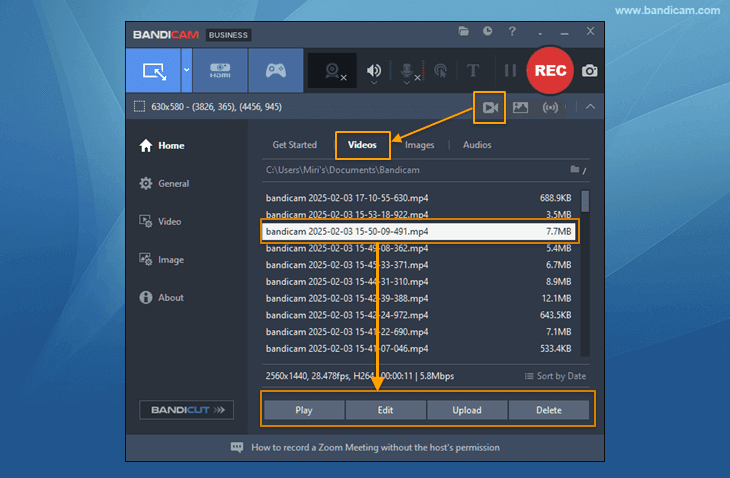
Step 3: To play, edit, or upload the captured video, tap on the video icon.
Conclusion
Using AI chatbots can help you get more done in less time. In this review, we have introduced the six most useful and versatile AI chatbots on the market, including Microsoft Copilot for email management, ChatGPT for overall use, Gemini for product research, Perplexity.ai for research, Anthrophic’s Claude for programmers, and Jasper for branding. Moreover, we suggested Bandicam as a lightweight and functional screen recorder that can capture chatbot conversations, as the tools mentioned above have limited functionality for storing conversations.


