Try Bandicam Screen Recorder!
Download Bandicam (Free)How to Record Skype calls - Audio / Video

Skype is retiring in May 2025: Microsoft announced that Skype will be retired on May 5, 2025 and will be replaced by Microsoft Teams. You can record Teams meetings or calls using Bandicam. » How to record a Teams meeting
Skype alternatives
Skype will no longer be available after May 5, 2025. If you're looking for an alternative communication tool, consider options like Teams, Zoom, and Google Meet. Below, you'll find a comparison table of the free versions of Microsoft Teams, Zoom, and Google Meet to help you decide on the best alternative.
| Microsoft Teams | Zoom | Google Meet | |
|---|---|---|---|
| Main features | Video/voice calls, instant messaging, sharing files | Video/voice calls, sharing files | |
| Compatibility | Windows, macOS, Linux, Android, and iOS | ||
| Number of Participants | 100 | 100 | 100 |
| Meeting duration | 60 minutes | 40 minutes | 60 minutes |
| Recording privileges | Only host (for organization accounts) | Only host | Only host (for Google Workspace users) |
| Tip to record as participants | » Record a Teams Meeting as a Guest | » Record a Zoom meeting as a participant | » Record Google Meet as a participant |
Can I record Skype without anyone knowing?
If you use Skype’s recording feature, Skype will notify all participants that the call is being recorded. However, with a screen recorder like Bandicam, you can record Skype calls without anyone knowing.
Bandicam is a popular, easy-to-use, and reliable screen recording program. It allows you to easily record Skype calls for online meetings, podcasts, interviews, etc. Whatever you do on your screen can be captured with Bandicam. In addition, you can record only Skype audio and save it as an MP3 file.
How To Record a Skype Video Call
You can secretly record Skype video calls, conversations, interviews, etc., with Bandicam. Bandicam is the best Skype recording software for Windows. Follow the simple steps below to screen record on Skype:
Download Skype and the Skype Recorder, Bandicam.
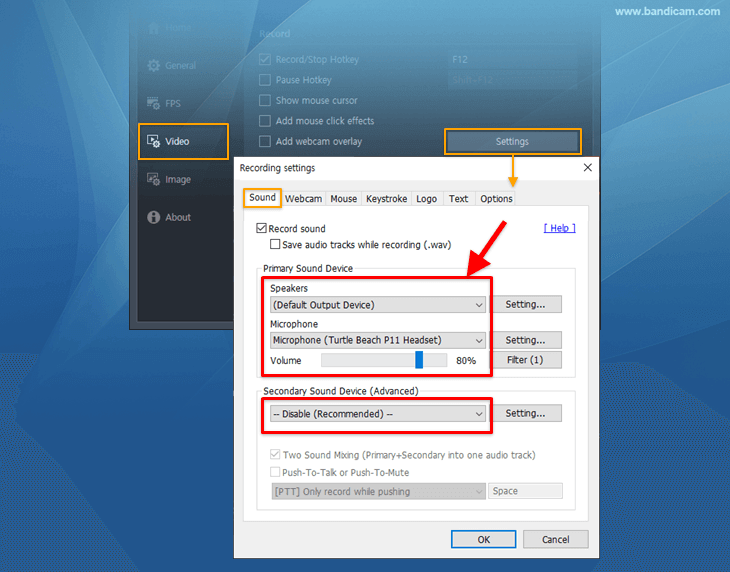
Start Bandicam and set the audio configuration.
You can record Skype calls, your voice, and your friend's voice at the same time.
-
Bandicam settings for Skype recording
![record skype audio]()
- To record both your computer sound and voice, select "(Default Output Device)" for the Speakers and "Your microphone device" for the Microphone.
- If you want to record computer sound without your voice, please choose "(Default Output Device)" for the Speakers and "Disable" for the Microphone.
-
Windows settings for Skype recording
Please check "Do nothing" under the [Communications] tab in Windows.
![Computer sounds, Communication, Do nothing]()
-
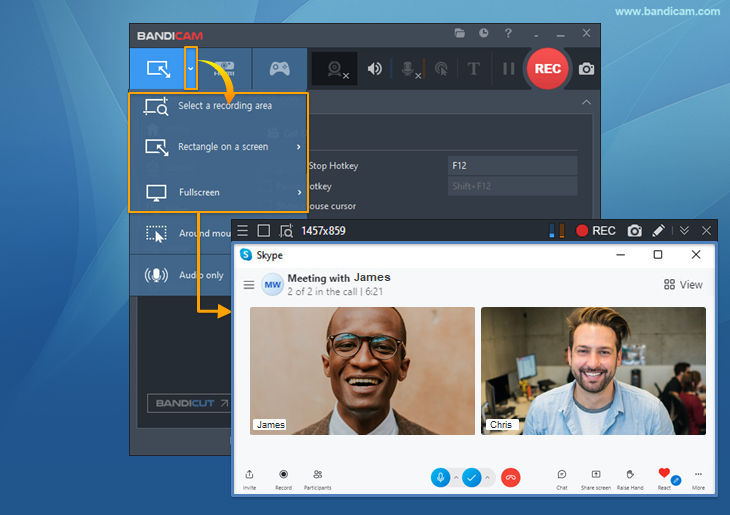
Start Skype and choose the recording mode in Bandicam
Select "Rectangle on a screen mode" or "Fullscreen mode" in Bandicam, and then click the '● REC' button or press the hotkey (F12) to start/stop the recording.
![recording a skype call, record skype video call, record skype interview]()
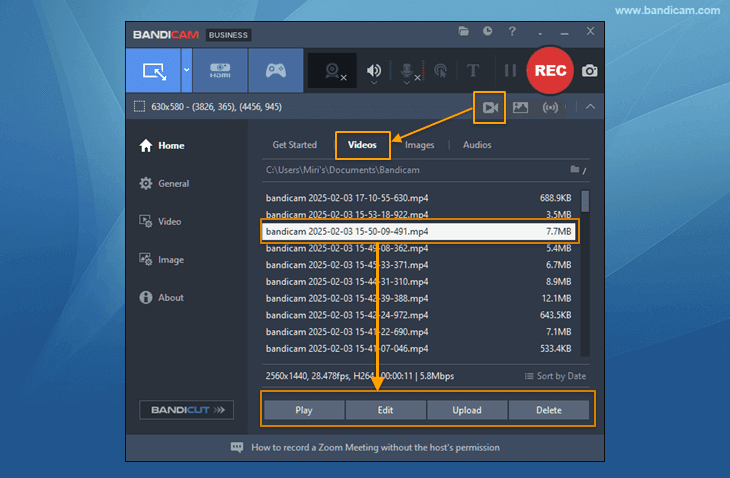
Click the ■ stop button or F12 shortcut key to finish the Skype recording.
Click on the video icon to access your recorded video. Now, you can play, edit, or upload the recorded Skype videos to YouTube and Vimeo.
![recorded Skype videos, Skype videos]()
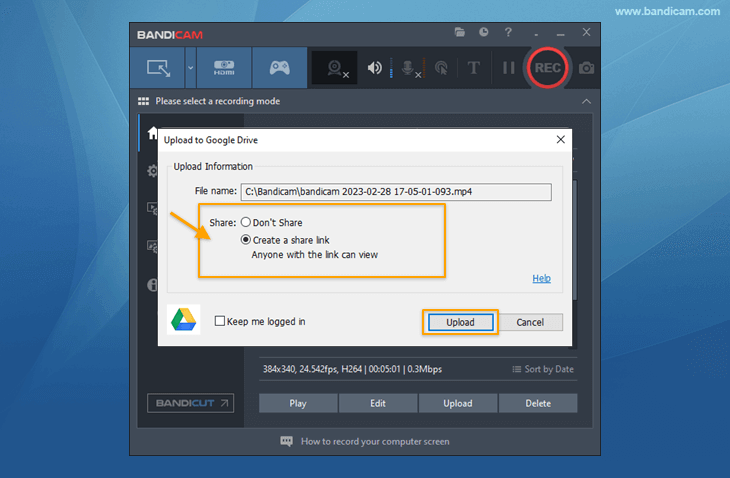
Quickly share the recorded Skype video with a link.
You can share the video as a link if you upload the recorded Skype videos to Google Drive.
![recorded Skype videos, share videos, Google Drive]()

How To Record Skype Audio Only
Are you looking for a free MP3 Skype Recorder? Bandicam's Audio-only Recording mode allows you to capture the audio of Skype calls.
Download the latest version of Bandicam and simply select the audio-only recording mode to record Skype audio.

Related FAQs about recording Skype calls
1. Why is there no audio on my Skype recording?
If you select the same 'Speaker Device' and your microphone device in Bandicam and Skype settings, you can record Skype audio.
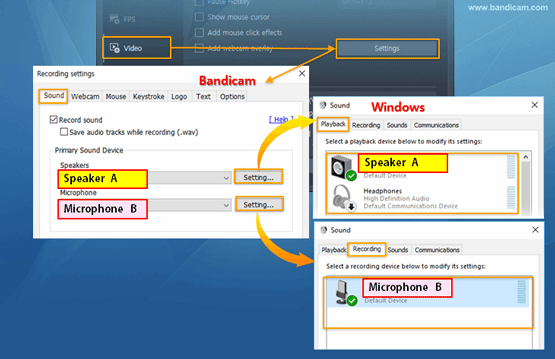
Bandicam and Windows sound settings

Skype audio settings
2. Does Skype record calls?
Skype has a recording function built in, but Skype calls are not recorded on its own. You will need to select the recording option in Skype to record calls.
3. What if you don't have a webcam device but want to make a video call?
You can use your smartphone or iPhone camera as an external webcam device using the IRIUN or DroidCam application.
4. Can I record Skype calls on Windows 10?
Yes, you can. Bandicam is a free video call recorder for Skype, which works on Windows 7/8/10/11, and Windows Vista.
Additional Tips
Last Updated on